Code::BlocksでのODE本サンプルプログラムのコンパイル法を説明しました.次に,自分で作成したODEを使ったプログラムのビルド法を説明します.不具合があったので記事を変更しました(2007-7-18).
- 自作プログラムのビルド法
- 自作プログラムは「ドキュメント」の下にsrc\ode\roboSimuというフォルダを作り,その中に作成することにします.Vistaの場合は以下のようなパスになります.
-
C:\Users\ユーザ名\Documents\src\ode\roboSimu
この意味はCドライブの中に、Usersというフォルダがあり、
その中にユーザ名のフォルダがあり、その中にDocuments、
その中にsrc、またその中にode、またまたその中にroboSimu
フォルダがあるということです.
-
- roobSimuフォルダの中に次のファイルをダウンロードし,その場所に解凍します.パスは
C:\Users\ユーザ名\Documents\src\ode\roboSimu\pro1-1
となります.
- ダウンロードファイル: pro1-1.zip
-
c:\ode-0.10.1\drawstuff
上のdrawstuffフォルダをコピーし、下のodeフォルダ
C:\Users\ユーザ名\Documents\src\ode
の中に貼り付ける。ここでは,簡単にするためにODE付属デモプログラムをビルドするときに使用した
c:\ode-0.10.1\build\cb-gcc\demo_basket.cbp
を使います.上で解凍したpro1-1の中にhello.cppとdemo_basket.cbpのファイルが出来ているはずです.
- demo_basket.cbpの名前をhello.cbpに変更する.
- Code::Blocksを起動し,上で名前を変えたhello.cbpを開く.
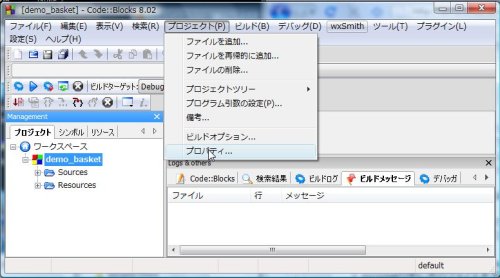
- 「プロジェクト(P)」→「プロパティ」を選択
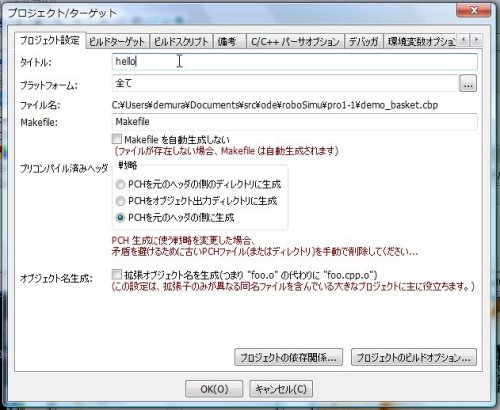
- プロジェクト/ターゲット画面が開くので「タイトル:」をhelloに変更し,「OK」をクリック
- 「プロジェクト(P)」→「ファイルの削除」で,demo_basket.cppにチェックをいれ,「OK」をクリックする.何も表示されない場合は,6の図のようにワークスペースの下にあるdemo_basketをクリックして文字を反転させる.
- 「プロジェクト(P)」→「ファイルを追加」で,hello.cppを追加する.
- 「複数選択」の画面が開くので,DebugDoubleLibにチェックを入れ「OK」をクリック
- 「プロジェクト(P)」→「プロパティ」を選択
- ビルドターゲットのタブを選択し,ビルドターゲットはDebugDoubleLibを残し,他は全部削除する.出力ファイル名,オブジェクト出力ディレクトリを以下のように変更する.っていることを確認し「OK」をクリック.
- 出力ファイル名: hello.exe
- オブジェクト出力ディレクトリ: obj
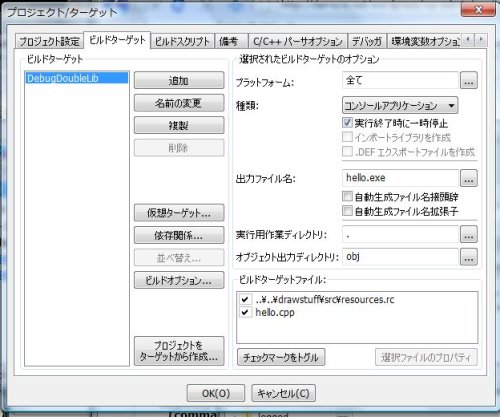
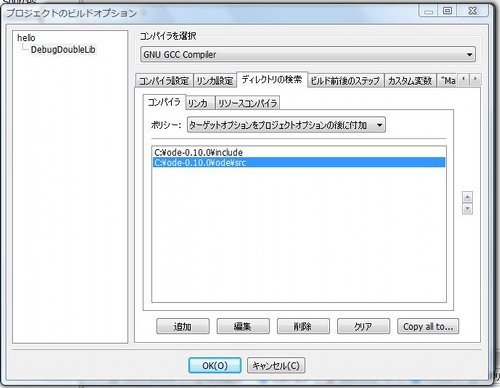
- 次に同じ画面の「ビルドオプション...」をクリック.以下の「プロジェクトのビルドオプション」の画面になる.「ディレクトリの検索」のタブを選択.
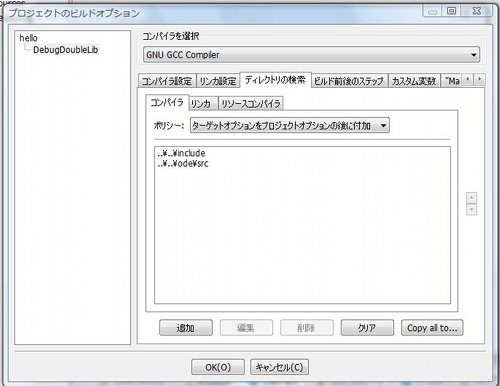
- パスを以下のように変更し,「OK」をクリックする.
-
..\..\include
を
C:\ode-0.10.1\include
へ変更
-
..\..\ode\src
C:\ode-0.10.1\ode\src


へ変更
-
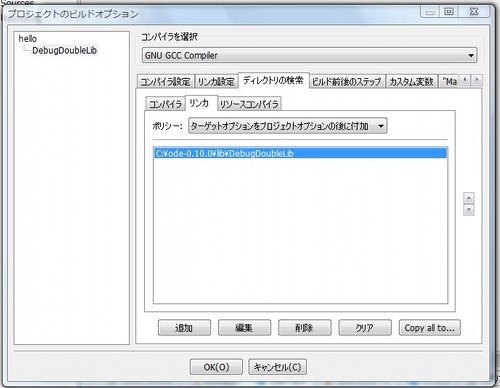
- 同じウインドウの「コンパイラ」の右にある「リンカ」のタブを選択し,パスを以下のように変更し,「OK」をクリックする.
-
..\..\lib\DebugDoubleLib
を
C:\ode-0.10.1\lib\DebugDoubleLib
へ変更
-
- 「ビルド(B)」→「ビルドして実行(L)」を選択
- 赤い球が自由落下し,地面を突き抜けたら成功.お疲れ様!
- なお,参考までに作業後のプロジェクトファイルはpro1-1after1.zipです.
- 自作プログラムは「ドキュメント」の下にsrc\ode\roboSimuというフォルダを作り,その中に作成することにします.Vistaの場合は以下のようなパスになります.
でむ

コメント
おいそがしいところ、すみません。
早速確認してみます。
悩める親父さん,
つくばチャレンジで取り込んでいて返事が遅れてすみません.
ODEのヘッダーファイルが読み込まれていません.14番のパスを確認してください.もし,ODE0.10.1をお使いの場合は,0.10.0を0.10.1に変更してくださいね.
でむ
||=== hello, DebugDoubleLib ===|
C:\Documents and Settings\takaakiW\My Documents\src\ode\roboSimu\pro1-1\hello.cpp|1|ode/ode.h: No such file or directory|
C:\Documents and Settings\takaakiW\My Documents\src\ode\roboSimu\pro1-1\hello.cpp|2|drawstuff/drawstuff.h: No such file or directory|
C:\Documents and Settings\takaakiW\My Documents\src\ode\roboSimu\pro1-1\hello.cpp|4|error: `dWorldID’ does not name a type|
C:\Documents and Settings\takaakiW\My Documents\src\ode\roboSimu\pro1-1\hello.cpp|5|error: `dBodyID’ does not name a type|
C:\Documents and Settings\takaakiW\My Documents\src\ode\roboSimu\pro1-1\hello.cpp|6|error: `dReal’ does not name a type|
C:\Documents and Settings\takaakiW\My Documents\src\ode\roboSimu\pro1-1\hello.cpp|7|error: `dsFunctions’ does not name a type|
C:\Documents and Settings\takaakiW\My Documents\src\ode\roboSimu\pro1-1\hello.cpp||In function `void simLoop(int)’:|
C:\Documents and Settings\takaakiW\My Documents\src\ode\roboSimu\pro1-1\hello.cpp|11|error: `world’ was not declared in this scope|
||=== Build finished: 35 個のエラー、 0 個の警告 ===|
長くなるのですが、すべてのエラーを表示します。
pro1-1.zipを解凍し、自作プログラムのビルド法を上記を参考に
進めてみたのですがエラーが出ました。前回とは違って内容を見ると
具体的なエラーのようですがよくわかりません。教えていただけないでしょうか?
MinGwは以前インストールしましたが、アンインストールはすでに
してあると思います。もう一度確認して見ます。
ビルドしたのはhello.cppです。
悩める親父さん、
何をビルドして実行したのでしょうか?エラーメッセージが他にあれば全て教えてください。
また、Code::Blocksをインストールする以前からMinGWを使われていましたか? パスを変えないと競合するようです。
でむ
上記の作業後、ビルドして実行をおこなったところ、下記のエラーがでました。
undefined reference to ‘ WinMain@16’
と出ました。原因は何でしょう。宜しくお願いします。
demuraさん、
このページの方法を参考にしてC:\Documents and Settings\onishi\My Documents\src\odeのなかに新しいフォルダを作って、試しましたが、
————– Build: DebugDoubleLib in hello —————
コンパイル中: hello.cpp
コンパイル中: ..\..\drawstuff\src\resources.rc
リンク中 コンソール実行ファイル: hello.exe
C:\Program Files\CodeBlocks\MinGW\bin\ld.exe: c:\ode-0.10.1\lib\DebugDoubleLib: No such file: Permission denied
collect2: ld returned 1 exit status
プロセスはステータス 1 で終了しました (0 分 2 秒)
0 個のエラー、 0 個の警告
で終了しました 解決方法を教えていただければ幸いです。
demuさん、こんにちは
このページの方法を参考にしてC:\ode-0.10.0\mybuildのなかに
新しいフォルダを作って、試しましたが、
——-Build: DebugDoubleLib in hello ——-
リンク中 コンソール実行ファイル: hello.exe
C:/Program Files/CodeBlocks/MinGW/bin/../lib/gcc/mingw32/3.4.5/../../../libmingw32.a(main.o):main.c:(.text+0x104): undefined reference to `_WinMain@16′
collect2: ld returned 1 exit status
プロセスはステータス 1 で終了しました (0 分 0 秒)
1 個のエラー、 0 個の警告
と叱られました。怪しいところを教えていただければ幸いです。
問題を解決することができました.
ありがとうございました.
mif805さん,
いつもありがとうございます.自分では気が付かなかったので大変助かります.
ご指摘のとおりです.不具合箇所を訂正しました.
原因は,私のファイルを確認したところ,c:\ode-0.10.0\lib\DebugDoubleLibの中身をc:\Users\ユーザ名\Documents\src\ode\libの中にコピーしていたので,訂正前の記事でビルドできました.
また,以前説明していた方法は,Code::Blocks全体の環境設定でライブラリなどを指定していたので,いろいろなプログラムを作成するときには良い方法ではありません.各プロジェクトファイルの中で指定するように変更しました.
でむ
demuさん、こんにちは
上記の方法でWindowsXPとubuntu8.04で試したところ,
両方ともエラーが出ました.
XPのほうでは
————– Build: DebugDoubleLib in hello —————
コンパイル中: hello.cpp
コンパイル中: ..\..\drawstuff\src\resources.rc
リンク中 コンソール実行ファイル: hello.exe
C:\Program Files\CodeBlocks\MinGW\bin\ld.exe: cannot find -lode_doubled
collect2: ld returned 1 exit status
プロセスはステータス 1 で終了しました (0 分 0 秒)
1 個のエラー、 0 個の警告
となりました.ubuntuでも/usr/bin/ld: cannot find -lode_doubledと表示されました.なにが原因なのでしょうか?