AIロボット入門2024:LXDEデスクトップ環境の使い方
education
2024.09.26
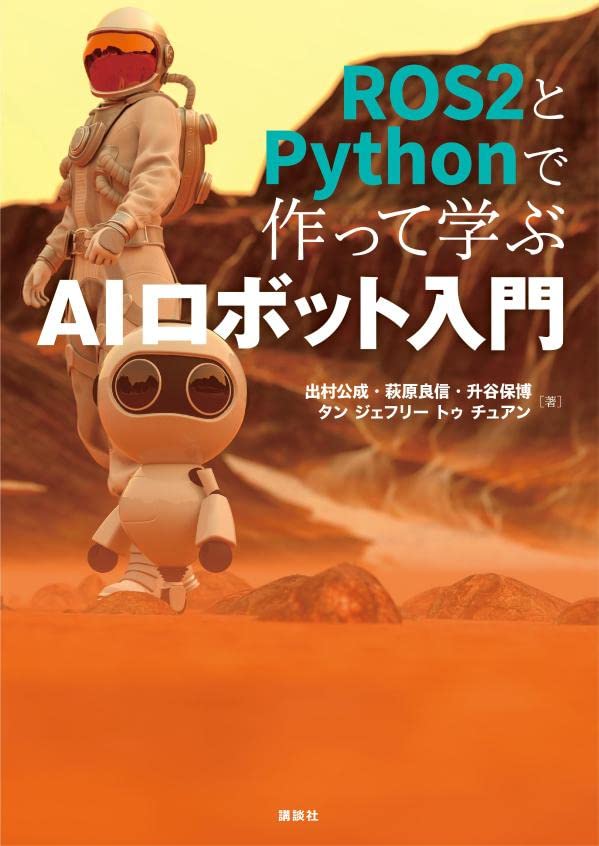
拙著「ROS2とPythonで作って学ぶAIロボット入門」(講談社)を授業で使用する場合の講義資料です.
今回は,この本のDockerイメージが使っているUbuntuの軽量デスクトップLXDE (Lightweight X11 Desktop Environment) と良く使うアプリケーションの使い方を説明します.
1.レクチャ
この本のDockerイメージで使っているUbuntuのデスクトップ環境はLXDE (Lightweight X11 Desktop Environment)とよばれるものでGPLライセンスで配布されるオープンソースのソフトウェアです.
使用するリソースが少ないので組み込みボードや非力なコンピュータで使用でき,使い慣れたインタフェースで直感的に使えます.
アプリケーションの起動
各種アプリケーションの起動は,Windowsのようにデスクトップ左下の[Start]ボタンから行う.[Start]ボタンをクリックすると下図のようにメニューが表示される.
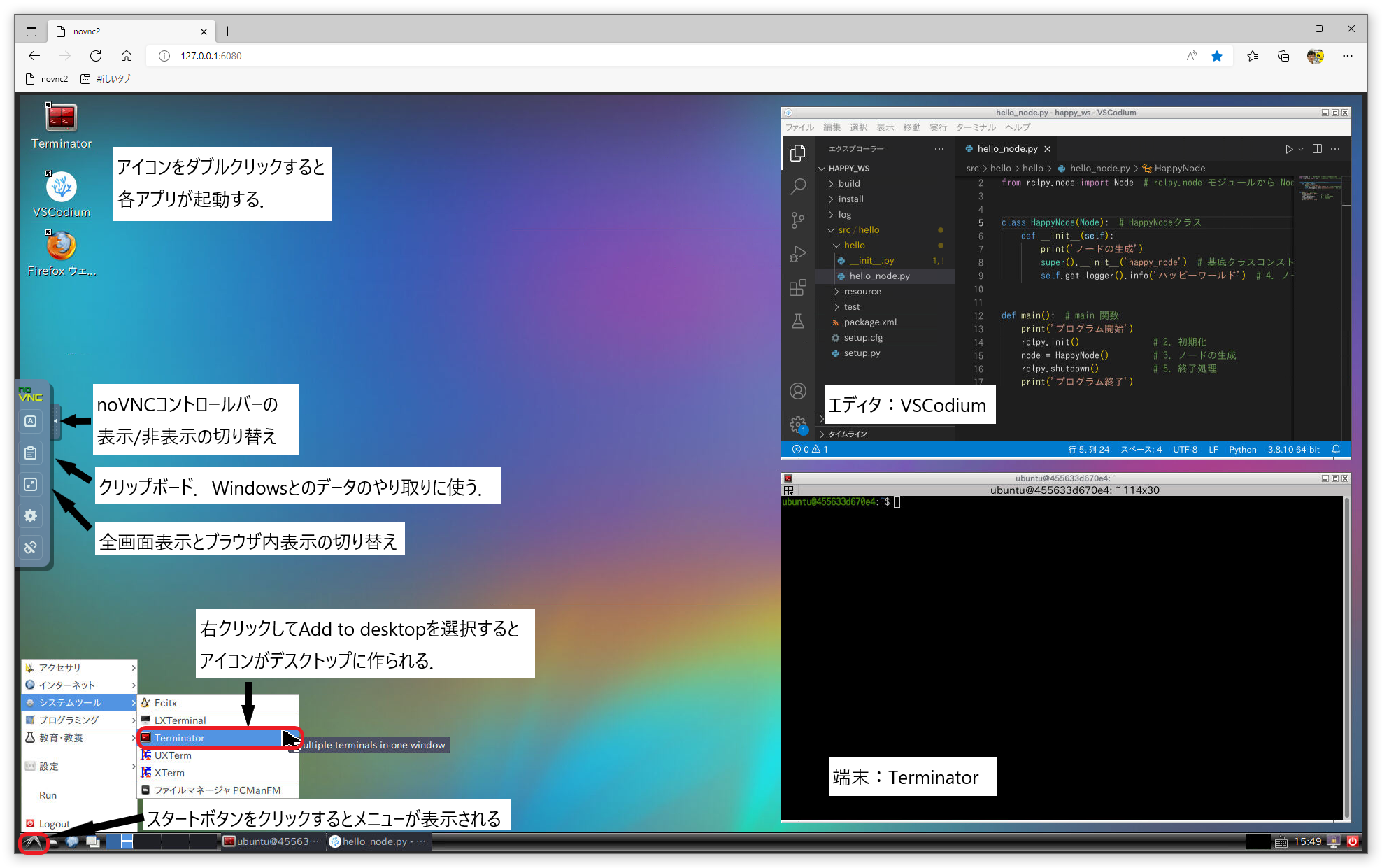
- メニューの項目(良く使う物を太字で表記)
- アクセサリ
- インターネット
- システムツール
- 端末 Terminator
- ファイルマネージャ PCManFM
- プログラミング
- 教育・教養
- 設定:各種設定可能
- Run:ウインドウが開き,コマンドを入力・実行できる.
端末 Terminator
SF映画のタイトルのような端末.ROS2では多くのコマンドを入力して実行するので端末の画面を分割できると便利.いろいろなアプリがあるのが,Termnatorはマウス操作で分割できるので,キー操作を覚える必要がなく初心者には便利なのでこれを使う.
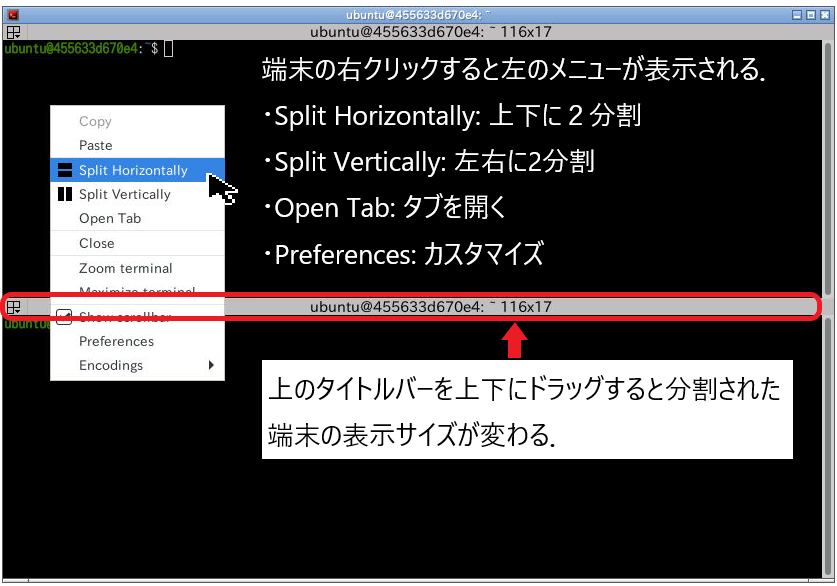
マウス操作は下図を参照.端末の黒い領域を右クリックするとメニューが表示されるので,好きな処理を選ぶ.端末を上下に2分割する場合が多いのでSplit Horizontallyを選ぶ場合が多い.端末を3分割したい場合は,2分割したどちらかの端末で同様にSplit Horizontallyを選べばよい.分割した端末のサイズを変更する場合は,タイトルバーをドラッグするだけで良い.簡単!簡単!
VSCodium
VSCodiumはマイクロソフトのVisual Studio Code(VSCode)のオープンソース版なので,使い方はVSCodeと同じなので,Visual Stuido CodeやVSCodeで検索してください.なお,VSCodeは開発用エディタの定番です.
起動の仕方は,次のコマンドを端末で打ち込んでください.このコマンドの意味はまず,cdコマンドで指定したディレクトリへ移動します.次のcodiumコマンドでVSCodiumを起動します.codiumの後は半角スペースを入力した後に.(ドット)を入力します.この意味は現在のディレクトリです.つまり,VSCodiumで指定したディレクトリを開きます.
2.ハンズオン
手を動かして使い方をマスターしましょう.
- デスクトップにTerminator,FireFox,VSCodiumのアイコンを作ってみよう!
- スタートメニューからアプリを選択し、右クリックして[Add to desktop]を選択するとアイコンがデスクトップに追加される。
- Terminatorを起動して以下のやってみよう!
- 端末を上下に2分割する.
- 端末を上下に3分割する.
- 3分割した端末を1つの端末に戻す
- 端末を左右に分割する.
- Tabを作る.
- FireFoxを起動して以下のサイトを表示しよう!
- VSCodiumを起動して,’Hello World’と表示するPythonプログラムを作成して,以下のファイルに保存して,実行してみよう!
3.参考リンク
参考リンクはできるだけ原典にしています.英語が多いのでわかりづらい場合は,日本語でネット検索するといろいろ情報が見つかります.
終わり
").attr(n.scriptAttrs||{}).prop({charset:n.scriptCharset,src:n.url}).on("load error",i=function(e){r.remove(),i=null,e&&t("error"===e.type?404:200,e.type)}),C.head.appendChild(r[0])},abort:function(){i&&i()}}});var Jt,Kt=[],Zt=/(=)\?(?=&|$)|\?\?/;ce.ajaxSetup({jsonp:"callback",jsonpCallback:function(){var e=Kt.pop()||ce.expando+"_"+jt.guid++;return this[e]=!0,e}}),ce.ajaxPrefilter("json jsonp",function(e,t,n){var r,i,o,a=!1!==e.jsonp&&(Zt.test(e.url)?"url":"string"==typeof e.data&&0===(e.contentType||"").indexOf("application/x-www-form-urlencoded")&&Zt.test(e.data)&&"data");if(a||"jsonp"===e.dataTypes[0])return r=e.jsonpCallback=v(e.jsonpCallback)?e.jsonpCallback():e.jsonpCallback,a?e[a]=e[a].replace(Zt,"$1"+r):!1!==e.jsonp&&(e.url+=(At.test(e.url)?"&":"?")+e.jsonp+"="+r),e.converters["script json"]=function(){return o||ce.error(r+" was not called"),o[0]},e.dataTypes[0]="json",i=ie[r],ie[r]=function(){o=arguments},n.always(function(){void 0===i?ce(ie).removeProp(r):ie[r]=i,e[r]&&(e.jsonpCallback=t.jsonpCallback,Kt.push(r)),o&&v(i)&&i(o[0]),o=i=void 0}),"script"}),le.createHTMLDocument=((Jt=C.implementation.createHTMLDocument("").body).innerHTML="
",2===Jt.childNodes.length),ce.parseHTML=function(e,t,n){return"string"!=typeof e?[]:("boolean"==typeof t&&(n=t,t=!1),t||(le.createHTMLDocument?((r=(t=C.implementation.createHTMLDocument("")).createElement("base")).href=C.location.href,t.head.appendChild(r)):t=C),o=!n&&[],(i=w.exec(e))?[t.createElement(i[1])]:(i=Ae([e],t,o),o&&o.length&&ce(o).remove(),ce.merge([],i.childNodes)));var r,i,o},ce.fn.load=function(e,t,n){var r,i,o,a=this,s=e.indexOf(" ");return-1
").append(ce.parseHTML(e)).find(r):e)}).always(n&&function(e,t){a.each(function(){n.apply(this,o||[e.responseText,t,e])})}),this},ce.expr.pseudos.animated=function(t){return ce.grep(ce.timers,function(e){return t===e.elem}).length},ce.offset={setOffset:function(e,t,n){var r,i,o,a,s,u,l=ce.css(e,"position"),c=ce(e),f={};"static"===l&&(e.style.position="relative"),s=c.offset(),o=ce.css(e,"top"),u=ce.css(e,"left"),("absolute"===l||"fixed"===l)&&-1<(o+u).indexOf("auto")?(a=(r=c.position()).top,i=r.left):(a=parseFloat(o)||0,i=parseFloat(u)||0),v(t)&&(t=t.call(e,n,ce.extend({},s))),null!=t.top&&(f.top=t.top-s.top+a),null!=t.left&&(f.left=t.left-s.left+i),"using"in t?t.using.call(e,f):c.css(f)}},ce.fn.extend({offset:function(t){if(arguments.length)return void 0===t?this:this.each(function(e){ce.offset.setOffset(this,t,e)});var e,n,r=this[0];return r?r.getClientRects().length?(e=r.getBoundingClientRect(),n=r.ownerDocument.defaultView,{top:e.top+n.pageYOffset,left:e.left+n.pageXOffset}):{top:0,left:0}:void 0},position:function(){if(this[0]){var e,t,n,r=this[0],i={top:0,left:0};if("fixed"===ce.css(r,"position"))t=r.getBoundingClientRect();else{t=this.offset(),n=r.ownerDocument,e=r.offsetParent||n.documentElement;while(e&&(e===n.body||e===n.documentElement)&&"static"===ce.css(e,"position"))e=e.parentNode;e&&e!==r&&1===e.nodeType&&((i=ce(e).offset()).top+=ce.css(e,"borderTopWidth",!0),i.left+=ce.css(e,"borderLeftWidth",!0))}return{top:t.top-i.top-ce.css(r,"marginTop",!0),left:t.left-i.left-ce.css(r,"marginLeft",!0)}}},offsetParent:function(){return this.map(function(){var e=this.offsetParent;while(e&&"static"===ce.css(e,"position"))e=e.offsetParent;return e||J})}}),ce.each({scrollLeft:"pageXOffset",scrollTop:"pageYOffset"},function(t,i){var o="pageYOffset"===i;ce.fn[t]=function(e){return M(this,function(e,t,n){var r;if(y(e)?r=e:9===e.nodeType&&(r=e.defaultView),void 0===n)return r?r[i]:e[t];r?r.scrollTo(o?r.pageXOffset:n,o?n:r.pageYOffset):e[t]=n},t,e,arguments.length)}}),ce.each(["top","left"],function(e,n){ce.cssHooks[n]=Ye(le.pixelPosition,function(e,t){if(t)return t=Ge(e,n),_e.test(t)?ce(e).position()[n]+"px":t})}),ce.each({Height:"height",Width:"width"},function(a,s){ce.each({padding:"inner"+a,content:s,"":"outer"+a},function(r,o){ce.fn[o]=function(e,t){var n=arguments.length&&(r||"boolean"!=typeof e),i=r||(!0===e||!0===t?"margin":"border");return M(this,function(e,t,n){var r;return y(e)?0===o.indexOf("outer")?e["inner"+a]:e.document.documentElement["client"+a]:9===e.nodeType?(r=e.documentElement,Math.max(e.body["scroll"+a],r["scroll"+a],e.body["offset"+a],r["offset"+a],r["client"+a])):void 0===n?ce.css(e,t,i):ce.style(e,t,n,i)},s,n?e:void 0,n)}})}),ce.each(["ajaxStart","ajaxStop","ajaxComplete","ajaxError","ajaxSuccess","ajaxSend"],function(e,t){ce.fn[t]=function(e){return this.on(t,e)}}),ce.fn.extend({bind:function(e,t,n){return this.on(e,null,t,n)},unbind:function(e,t){return this.off(e,null,t)},delegate:function(e,t,n,r){return this.on(t,e,n,r)},undelegate:function(e,t,n){return 1===arguments.length?this.off(e,"**"):this.off(t,e||"**",n)},hover:function(e,t){return this.on("mouseenter",e).on("mouseleave",t||e)}}),ce.each("blur focus focusin focusout resize scroll click dblclick mousedown mouseup mousemove mouseover mouseout mouseenter mouseleave change select submit keydown keypress keyup contextmenu".split(" "),function(e,n){ce.fn[n]=function(e,t){return 0
タイトルとURLをコピーしました
コメント