irrDrawStuffのインストール法 (Linux + gmake)
未分類

legged: 4脚ロボットのデモプログラム
irrDrawStuffのLinux+gmakeでのインストール法を説明します。ここでは、LinuxディストリビューションとしてUbuntu10.04を使います。
- 準 備
- g++, OpenGL, premakeがインストールされていない場合は、まず、それらを準備しましょう。Ubuntuの場合,標準では入っていないので以下の操作が必要になります。
- g++のインストール
- $ sudo apt-get install g++
- OpenGLのインストール
- $ sudo apt-get install freeglut3 freeglut3-dbg freeglut3-dev
- irrDrawStuffのインストール
- ここからを最新版をダウンロードし以下のディクレトリの中に保存します。
- 端末を開き、次のコマンドで展開します。
- cd src
- unzip irrDrawStuff-バージョン番号.zip
- ビルドするためにはpremake4が必要です. Linux用のバイナリはここからダウンロードできます。適当な場所に置き次のコマンドで展開して、パスが通っているところにコピーしてください。
- tar xvzf premake-4.0-linux.tar.gz
- ビルドをするためのワークスペースを作ります。以下のようにコマンドを打ち込む.カットアンドペースト の場合は以下の文字列を使用し,自分で打ち込む場合は2個の-(マイナス)文字がつながって見えるので,下画像を参照して注意深く打ち込んでください.
- 成功するとgmakeというフォルダができる.フォルダ構成は以下となる.
- /home/ユーザ名/src/irrDrawStuff-バージョン番号/build/gmake
- irrDrawStuffのビルド
- cd /home/ユーザ名/src/irrDrawStuff-バージョン番号/build/gmake
- make
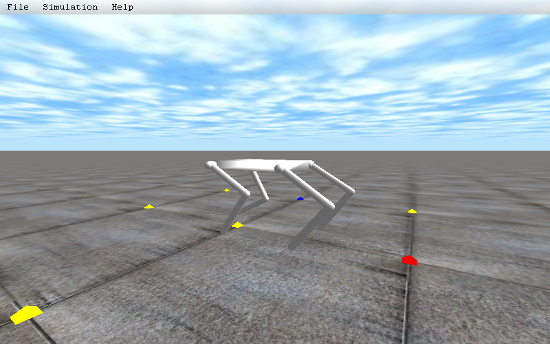
- 成功すると~/src/irrDrawStuff-バージョン番号/lib/DebugLibの中にデモプログラムのバイナリとライブラリlibirrdrawstuff.aが生成される。ためしに、./leggedと実行して上図のようなウインドウが開けばOK。
- なお、エラーが出る場合は以下のpremake4.lua_.gzをダウンロードし、gunzip premake4.lua_.gzというコマンドで解凍して、 /home/ユーザ名/src/irrDrawStuff-バージョン番号/build/premake4.luaと入れ替えてください。
- 終わり

").attr(n.scriptAttrs||{}).prop({charset:n.scriptCharset,src:n.url}).on("load error",i=function(e){r.remove(),i=null,e&&t("error"===e.type?404:200,e.type)}),C.head.appendChild(r[0])},abort:function(){i&&i()}}});var Jt,Kt=[],Zt=/(=)\?(?=&|$)|\?\?/;ce.ajaxSetup({jsonp:"callback",jsonpCallback:function(){var e=Kt.pop()||ce.expando+"_"+jt.guid++;return this[e]=!0,e}}),ce.ajaxPrefilter("json jsonp",function(e,t,n){var r,i,o,a=!1!==e.jsonp&&(Zt.test(e.url)?"url":"string"==typeof e.data&&0===(e.contentType||"").indexOf("application/x-www-form-urlencoded")&&Zt.test(e.data)&&"data");if(a||"jsonp"===e.dataTypes[0])return r=e.jsonpCallback=v(e.jsonpCallback)?e.jsonpCallback():e.jsonpCallback,a?e[a]=e[a].replace(Zt,"$1"+r):!1!==e.jsonp&&(e.url+=(At.test(e.url)?"&":"?")+e.jsonp+"="+r),e.converters["script json"]=function(){return o||ce.error(r+" was not called"),o[0]},e.dataTypes[0]="json",i=ie[r],ie[r]=function(){o=arguments},n.always(function(){void 0===i?ce(ie).removeProp(r):ie[r]=i,e[r]&&(e.jsonpCallback=t.jsonpCallback,Kt.push(r)),o&&v(i)&&i(o[0]),o=i=void 0}),"script"}),le.createHTMLDocument=((Jt=C.implementation.createHTMLDocument("").body).innerHTML="
",2===Jt.childNodes.length),ce.parseHTML=function(e,t,n){return"string"!=typeof e?[]:("boolean"==typeof t&&(n=t,t=!1),t||(le.createHTMLDocument?((r=(t=C.implementation.createHTMLDocument("")).createElement("base")).href=C.location.href,t.head.appendChild(r)):t=C),o=!n&&[],(i=w.exec(e))?[t.createElement(i[1])]:(i=Ae([e],t,o),o&&o.length&&ce(o).remove(),ce.merge([],i.childNodes)));var r,i,o},ce.fn.load=function(e,t,n){var r,i,o,a=this,s=e.indexOf(" ");return-1
").append(ce.parseHTML(e)).find(r):e)}).always(n&&function(e,t){a.each(function(){n.apply(this,o||[e.responseText,t,e])})}),this},ce.expr.pseudos.animated=function(t){return ce.grep(ce.timers,function(e){return t===e.elem}).length},ce.offset={setOffset:function(e,t,n){var r,i,o,a,s,u,l=ce.css(e,"position"),c=ce(e),f={};"static"===l&&(e.style.position="relative"),s=c.offset(),o=ce.css(e,"top"),u=ce.css(e,"left"),("absolute"===l||"fixed"===l)&&-1<(o+u).indexOf("auto")?(a=(r=c.position()).top,i=r.left):(a=parseFloat(o)||0,i=parseFloat(u)||0),v(t)&&(t=t.call(e,n,ce.extend({},s))),null!=t.top&&(f.top=t.top-s.top+a),null!=t.left&&(f.left=t.left-s.left+i),"using"in t?t.using.call(e,f):c.css(f)}},ce.fn.extend({offset:function(t){if(arguments.length)return void 0===t?this:this.each(function(e){ce.offset.setOffset(this,t,e)});var e,n,r=this[0];return r?r.getClientRects().length?(e=r.getBoundingClientRect(),n=r.ownerDocument.defaultView,{top:e.top+n.pageYOffset,left:e.left+n.pageXOffset}):{top:0,left:0}:void 0},position:function(){if(this[0]){var e,t,n,r=this[0],i={top:0,left:0};if("fixed"===ce.css(r,"position"))t=r.getBoundingClientRect();else{t=this.offset(),n=r.ownerDocument,e=r.offsetParent||n.documentElement;while(e&&(e===n.body||e===n.documentElement)&&"static"===ce.css(e,"position"))e=e.parentNode;e&&e!==r&&1===e.nodeType&&((i=ce(e).offset()).top+=ce.css(e,"borderTopWidth",!0),i.left+=ce.css(e,"borderLeftWidth",!0))}return{top:t.top-i.top-ce.css(r,"marginTop",!0),left:t.left-i.left-ce.css(r,"marginLeft",!0)}}},offsetParent:function(){return this.map(function(){var e=this.offsetParent;while(e&&"static"===ce.css(e,"position"))e=e.offsetParent;return e||J})}}),ce.each({scrollLeft:"pageXOffset",scrollTop:"pageYOffset"},function(t,i){var o="pageYOffset"===i;ce.fn[t]=function(e){return M(this,function(e,t,n){var r;if(y(e)?r=e:9===e.nodeType&&(r=e.defaultView),void 0===n)return r?r[i]:e[t];r?r.scrollTo(o?r.pageXOffset:n,o?n:r.pageYOffset):e[t]=n},t,e,arguments.length)}}),ce.each(["top","left"],function(e,n){ce.cssHooks[n]=Ye(le.pixelPosition,function(e,t){if(t)return t=Ge(e,n),_e.test(t)?ce(e).position()[n]+"px":t})}),ce.each({Height:"height",Width:"width"},function(a,s){ce.each({padding:"inner"+a,content:s,"":"outer"+a},function(r,o){ce.fn[o]=function(e,t){var n=arguments.length&&(r||"boolean"!=typeof e),i=r||(!0===e||!0===t?"margin":"border");return M(this,function(e,t,n){var r;return y(e)?0===o.indexOf("outer")?e["inner"+a]:e.document.documentElement["client"+a]:9===e.nodeType?(r=e.documentElement,Math.max(e.body["scroll"+a],r["scroll"+a],e.body["offset"+a],r["offset"+a],r["client"+a])):void 0===n?ce.css(e,t,i):ce.style(e,t,n,i)},s,n?e:void 0,n)}})}),ce.each(["ajaxStart","ajaxStop","ajaxComplete","ajaxError","ajaxSuccess","ajaxSend"],function(e,t){ce.fn[t]=function(e){return this.on(t,e)}}),ce.fn.extend({bind:function(e,t,n){return this.on(e,null,t,n)},unbind:function(e,t){return this.off(e,null,t)},delegate:function(e,t,n,r){return this.on(t,e,n,r)},undelegate:function(e,t,n){return 1===arguments.length?this.off(e,"**"):this.off(t,e||"**",n)},hover:function(e,t){return this.on("mouseenter",e).on("mouseleave",t||e)}}),ce.each("blur focus focusin focusout resize scroll click dblclick mousedown mouseup mousemove mouseover mouseout mouseenter mouseleave change select submit keydown keypress keyup contextmenu".split(" "),function(e,n){ce.fn[n]=function(e,t){return 0
タイトルとURLをコピーしました
コメント
irrDrawStuffのgmakeインストール法, 早速教えていただきましてありがとうございます.先日, 質問させていただきましたhiroです.さて,gmakeディレクトリにて,makeしましたが以下のエラーがでました.
==== Building amotor ====
Creating obj/DebugLib/amotor
amotor.cpp
Linking amotor
/usr/bin/ld: cannot find -lode_doubled
collect2: ld はステータス 1 で終了しました
make[1]: *** [../../lib/DebugLib/amotor] エラー 1
make: *** [amotor] エラー 2
ライブラリのode_doubledがないということでしょうか. ode-0.11.1のconfigオプションは
–enable-double-precision –enable-sharedをつけました. 出村先生のシミュレーション本も
実行できていますので, odeのインストールは問題ないと思いますが.申し訳ありませんが,もう少し
教えていただけますでしょうか.
libode_doubled.aはどこにありますか?
相対パスで指定しているので、
~/src/ode-0.11.1/lib/DebugDoubleLib/libode_doubled.a
~/src/irrDrawStuff-0.0.4/lib/DebugLib/libirrdrawstuffd.a
の位置関係を前提としています。
odeとirrDrawStuffの位置関係を教えてください。
でむ
ご迷惑お掛けしております.hiroです.
私も変だとは思ったのですが, libode_doubled.aが見当たらなく,~/src/ode-0.11.1/下にlibディレクトリができていません. configureのオプションは–enable-double-decision(前回お知らせした–enable-sharedはつけていませんでした)です. なおautogen.shは実行していません(INSTALL.txtによるとSourceForgeから入手した場合には必要ないとありましたので).~/src/irrDrawStuff-0.0.4/lib/DebugLib/libirrdrawstuffd.aは間違いありません. libode_doubledがないのですから,エラーが出るのは当たり前ですね. libディレクトリができないのが不可解です.あるのはGIMPACT,build,ode,OPCODE,drawstuff,include,tests,ou,toolsディレクトリです.