Most of this page was translated from http://demura.net/archives/9ode by Babel Fish Translation.
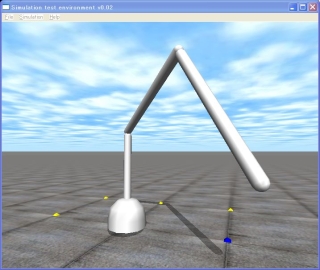
A 3DOF Robot Arm Petit Simulator (The source code is only about 100 lines)
It is 16th tutorial of this ODE(Open Dynamics Engine) Tutorial. ODE is an open source physics libary, and it is widely used in various game software, and simulators in research.
This time in order to rearrange present knowledge, it will try making the petit simulator of the simple 3 joint manipulator. Thisiswhen ODE is used,“This kind of simulator is produced with only 100 lines.”With being to be the program which is said it abbreviates the collision calculation part. Please try mounting the person who learned kinematics and opposite kinematics to this robot. When the robot moves, it is something which becomes matter of concern which is understood strangely.
So, the source code will be introduced next.
The robot can be controlled by a keyboard with following commads.
As for the 1st joint is moved with pushing ‘j’ (increase) or ‘f’ (decrease) key, the 2nd joint being the ‘d’ or ’k’ key, being the ‘s’ or ’l’ key, moves the 3rd joint. This has described in the command function of the program.
This program is simple enough for the person who has understood the past ODE lecture. You think that explanation almost does not need. If there is a place where it is not understood please write to comment.
[code]
// arm.cpp 3 DOF manipulator by Kosei Demura 2006
#include // ODE
#include // the drawing library of ODE
#ifdef dDouble
#define dsDrawCapsule dsDrawCapsuleD
#endif
#define NUM 4 // the number of links (base it includes)
dWorldID world; // Kinetics calculation world
dBodyID link [ NUM ]; // Link link [ as for 0 ] base
dJointID joint [ NUM ]; // Joint joint [ 0 ] locking base and the land
static double THETA [ NUM ] = {0.0, 0.0, 0.0, 0.0}; // Joint target angle [ rad ]
static double l [ NUM ] = {0.10, 0.90, 1.00, 1.00}; // Link length [ m ]
static double r [ NUM ] = {0.20, 0.04, 0.04, 0.04}; // Link radius [ m ]
// P control
void control () {
static int step = 0; // The number of steps of simulation
double k1 = 10.0, fMax = 100.0; // k1: Proportional gain, fMax: Largest torque [ Nm ]
printf (“\r%6d: “Step++);
for (int j = 1; J < NUM; J++) {
double tmpAngle = dJointGetHingeAngle (joint [ j ]); // Present joint angle [ rad ]
double z = THETA [ j ] – tmpAngle; // z: = target joint angle – Present joint angle
dJointSetHingeParam (joint [ j ], dParamVel and k1*z); // Setting of angular velocity
dJointSetHingeParam (joint [ j ], dParamFMax and fMax); // Setting of largest torque
}
}
//Drawing API initialization
//As for the API of ODE as for the unit of all joints [ rad ] is, but the argument 3 dimensional arrangement //hpr of dsSetViewpoint which is the API of drawstuff [ the unit of each element of 3 ] [ has become the ー ]. //Just this being to be different, you will pay attention!
void START () {
float xyz [ 3 ] = { 3.04, 1.28, 0.76}; // Point of view x, y and z [ m ]
float hpr [ 3 ] = {-160.0, 4.50, 0.00}; // Gaze (heading, pitch and roll) [ ー ]
dsSetViewpoint (xyz and hpr); // Setting of point of view and gaze
}
/ /Key operation function
/ /At each time there is input of the key value of that key is substituted in cmd.
void command (int cmd) {/
switch (cmd) {
case ‘j’: THETA [ 1 ] += 0.05; Break; // When the j key is pushed, THETA [ angle of 1 ] increases 0.05 [ rad ]
case ‘f’: THETA [ 1 ] -= 0.05; Break;
case ‘k’: THETA [ 2 ] += 0.05; Break;
case ‘d’: THETA [ 2 ] -= 0.05; Break;
case ‘l’: THETA [ 3 ] += 0.05; Break;
case ’s’: THETA [ 3 ] -= 0.05; Break;
}
//In order/ or target angle not to exceed the joint movable limits, it restricts
// The joint movable limits dJointSetHingeParam (dJointID, int parameter and dReal value) with, in case of the //joint lower limit in case of dParamLoStop and the joint upper limit set parameter to dParamHiStop. Value //inserts the value. As for unit [ rad ].
if (THETA [ 1 ] < – M_PI) THETA [ 1 ] = – M_PI; // M_PI is π
if (THETA [ 1 ] > M_PI) THETA [ 1 ] = M_PI;
if (THETA [ 2 ] < -2*M_PI/3) THETA [ 2 ] = – 2*M_PI/3;
if (THETA [ 2 ] > 2*M_PI/3) THETA [ 2 ] = 2*M_PI/3;
if (THETA [ 3 ] < -2*M_PI/3) THETA [ 3 ] = – 2*M_PI/3;
if (THETA [ 3 ] > 2*M_PI/3) THETA [ 3 ] = 2*M_PI/3;
}
// Simulation loop
// Each time it is called the execution time simulation. With the source code it is not understood, but this part // has entered into the while loop. In addition, here as for the cord/code regarding collision detection it is
// abbreviated.
void simLoop (int pause) {
control ();
dWorldStep (world, 0.02);
// Drawing of robot
dsSetColor (1.0,1.0,1.0); / Setting of color (r, g and b) as for each value 0? 1, here it sets to white
for (int i = 0; I < NUM; I++) / Drawing the link of the robot in the capsule
dsDrawCapsule (dBodyGetPosition (link [ i ]), dBodyGetRotation (link [ i ]), l [ i ], r [ i ]);
}
int main (int argc and char *argv [ ]) {
dsFunctions fn; // Drawing function
dMass mass; // Mass parameter
double x [ NUM ] = {0.00}, y [ NUM ] = {0.00}; // Balance station
double z [ NUM ] = {0.05, 0.50, 1.50, 2.55};
double m [ NUM ] = {10.00, 2.00, 2.00, 2.00}; // Mass
double anchor_x [ NUM ] = {0.00}, anchor_y [ NUM ] = {0.00};
double anchor_z [ NUM ] = {0.00, 0.10, 1.00, 2.00} ; //Rotary center
double axis_x [ NUM ] = {0.00, 0.00, 0.00, 0.00}; //Axis of rotation
double axis_y [ NUM ] = {0.00, 0.00, 1.00, 1.00};
double axis_z [ NUM ] = {1.00, 1.00, 0.00, 0.00};
fn.version = DS_VERSION; Fn.start = &start;
fn.step = &simLoop; Fn.command = &command;
fn.path_to_textures = “../.. /drawstuff/textures”;
world = dWorldCreate (); // Formation of the kinetics calculation world
dWorldSetGravity (world, 0, 0, -9.8); / / Gravity setting
for (int i = 0; I < NUM; I++) { // Formation of link it sets
link [ i ] = dBodyCreate (world); // Formation of link
dBodySetPosition (link [ i ], x [ i ], y [ i ], z [ i ]); // Setting of position
dMassSetZero (&mass); // Initialization of mass parameter
dMassSetCappedCylinderTotal (&mass, m [ i ],3, r [ i ], l [ i ]); // Mass calculation of link
dBodySetMass (link [ i ], &mass); // Setting of mass
}
// Formation of the joint it sets
joint [ 0 ] = dJointCreateFixed (world, 0); // Fixed joint (fixing of base and land)
dJointAttach (joint [ 0 ], link [ 0 ] and 0); // Installation of fixed joint
dJointSetFixed (joint [ 0 ]); // Setting of fixed joint
for (int j = 1; J < NUM; J++) {
joint [ j ] = dJointCreateHinge (world, 0); // Hinge joint formation
dJointAttach (joint [ j ], link [ j-1 ], link [ j ]); // Installation of joint
dJointSetHingeAnchor (joint [ j ], anchor_x [ j ], anchor_y [ j ], anchor_z [ j ]); // Setting in joint center
dJointSetHingeAxis (joint [ j ], axis_x [ j ], axis_y [ j ], axis_z [ j ]); // Setting of joint axis of rotation
}
dsSimulationLoop (argc, argv and 640, 570, &fn); / Simulation loop
return 0;
}
[/code]
Furthermore, the program is download possible from here. There is no warranty for this software. In order to operate, mingw is necessary. Please refer past tutorial.
- Arm070112.tar is copied in /home/ user name /src/ode-0.7/myprog. You are not concerned the last directory name myprog even with another name.
- Command below is executed with terminal software.
- dd – /src/ode-0.7/myprog
- tar xvf arm070112.tar
- cd arm
- make
- . /arm
End.

コメント