Webots講座4:自分の位置を知ろう (Python)
robot
2021.06.27
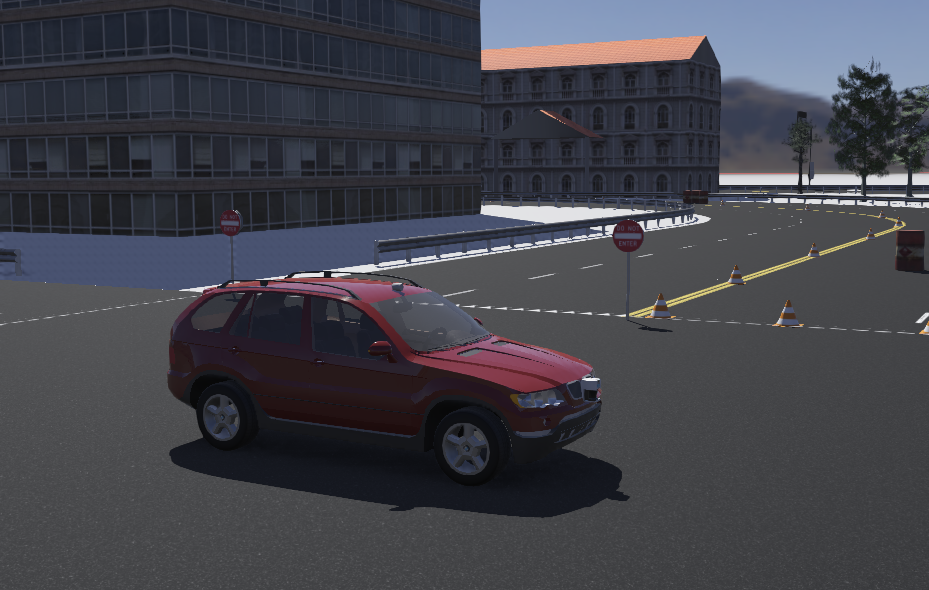
Webots講座の4回目です.今回も前回に引き続き,Webotsの自動運転シミュレータを使います.BMW X5に搭載されているGPSを使い自分の位置(自己位置)を知る方法を学びます.
レファレンス
自己位置の取得
- 自己位置の取得には内界センサや外界センサを使った方法があります.
- 内界センサ:ロボットの車速センサやステアリング角度センサなどの内部状態を知る内界センサを使い,その情報を使って自己位置を計算する方法をデッドレコニング(Dead Reckoning)とよびます.
- 外界センサ:GPS,LIDAR,カメラなどの外界センサの情報を使い自己位置を計算する方法.GPSセンサは自己位置を直接出力するので簡単に位置を取得できます.Webotsでは,ロボットにGPSノードを追加します.BMW X5にはGPSノードが組み込まれているので,APIを呼び出すだけ自己位置を取得できます.
GPSに関するAPI
- enable(samplingPeriod): GPSの測定を可能にする.引数のsamplingPeriodでセンサのサンプリング時間[ms]を指定できる.
- disable(): GPSの測定を不可能にする.
- getSamplingPeriod(): サンプリング時間[ms]を取得する.
- getValues(): GPSの測定結果(3次元ベクトル)を返す.値は座標系によりデカルト座標系の(x, y, z)[m]か世界測地系(WGS84)の(緯度,経度,高度)となる.
- getSpeed(): 速度[m/s]を返す.
- getCoordinateSystem(): 座標系を取得する.座標系はWorldInfoノードのgpsCoordinateSystemフィールドで定義されている.戻り値はWB_GPS_LOCAL_COORDINATEなら0,WB_GPS_WGS84_COORDINATEなら1である.
サンプルコード
''' robot_car2.py '''
import math # 数学モジュールのインポート
from vehicle import Driver # vehcleモジュールからDriverクラスをインポート
from controller import GPS # コントローラモジュールからGPSクラスをインポート
TIME_STEP = 60 # GPSのサンプリング時間 60[ms]
driver = Driver() # Driverクラスのインスタンスを生成
driver.setSteeringAngle(0.0) # ステアリングの角度を0.0[rad]に設定
driver.setCruisingSpeed(20) # 巡行速度を20[km/h]に設定
# GPS
gps = driver.getDevice("gps") # デバイス名から,そのクラスのインスタンスを生成
gps.enable(TIME_STEP) # サンプリング間隔TIME_STEPでGPSからデータを取得可能
coordinate = gps.getCoordinateSystem() # 座標系の取得
print("Coordinate system is ",coordinate)
while driver.step() != -1:
angle = 0.03 * math.cos(driver.getTime()) # ステアリング角の計算
driver.setSteeringAngle(angle) # ステアリング角の設定
# GPS
values = gps.getValues() # GPSからデータを取得
print("%g[s] position:(%g, %g, %g9[m]" % (driver.getTime(),values[0], values[1], values[2]))
if driver.getTime() > 5.0: # 5[s]経過したら
driver.setCruisingSpeed(0.0) # 停止
上のサンプルコードは,ロボットに搭載されているGPSセンサを使いデータを取得するまでの一連の処理が書かれ,ロボットはスタートしてから5[s]でストップします.コードの各行にコメントを入れているので細かい説明は各行を読んでください.なお,このシミュレータでは座標系はデカルト座標系が設定されているのでGPSから取得した値の単位は[m]になります.普通,GPSセンサからデータを取得すると世界測地系で単位は[°]になり,[m]に変換する処理が必要になるケースが多いです.この例では,それが不要なので簡単ですね.
ハンズオン
- Webots講座3:自動運転シミュレータ (Python)で実施した要領で,新規プロジェクトrobot_car2を作成して,ワールドcity.wbtをワールドrobot_car2.wbtに上書き保存する.
- サンプルコードをコントローラプログラムとして,シミュレーションを実行して動作を確認しよう.
- サンプルコードを改良して,10[m]前進して停止させるプログラムを作ろう.
- サンプルコードを改良して,Start地点から目標地点(進行方向に30[m],左方向に5[m])に走行して停止するプログラムを作ろう.
- ヒント:GPSセンサからStart地点の座標を取得して,目標地点のGPS座標系で位置を計算する.ロボットが目標地点に近づくようにステアリング角を制御する.制御方法は比例制御で良い.
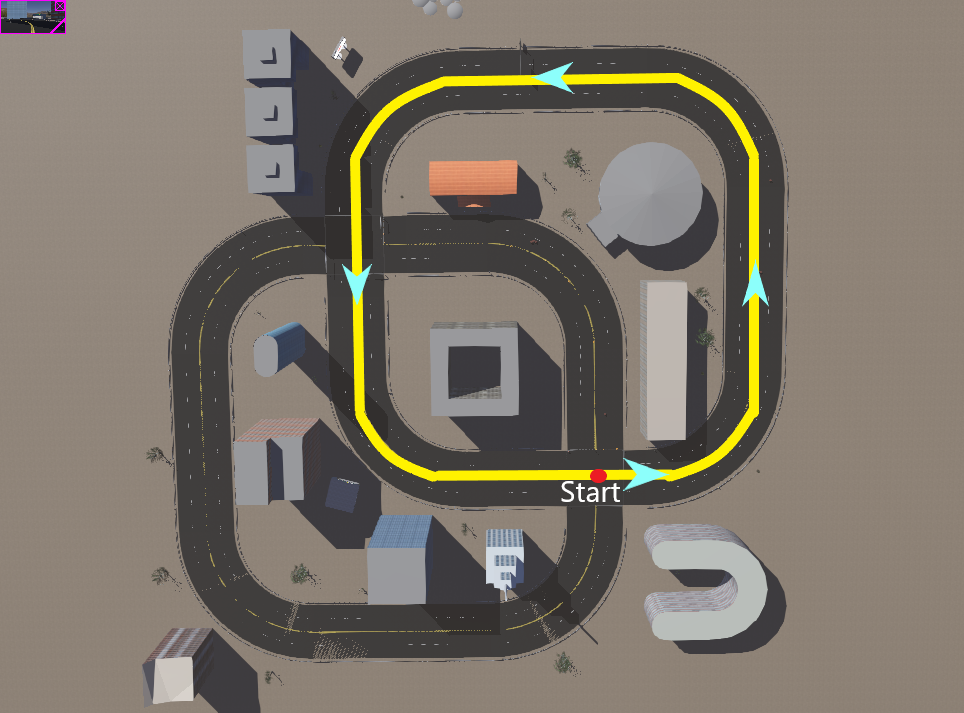
- サンプルコードを改良して,下図の黄色コースを1周する(Start地点から走行し,反時計まわりに1周してStart地点で停止する)プログラムを作ろう.
- ヒント:現時点ではGPSセンサしか使えないので,黄色コース上で通過する地点(ウエイポイント)を何点か決めて,その点を順番に経由することで1周すれば良い.これをウェイポイントナビゲーションとよぶ.途中で障害物があるので,それを避けるように経由点を設定する.
プチプロジェクト
- レファレンスを読んで,この自動運転シミュレータで使われているロボットカーBMW X5のモデルを調べて,デッドレコニングを実施しましょう.
- ヒント:ロボットカーはアッカーマン機構なので,その運動学を調べてデッドレコニングを実装する.
終わり
").attr(n.scriptAttrs||{}).prop({charset:n.scriptCharset,src:n.url}).on("load error",i=function(e){r.remove(),i=null,e&&t("error"===e.type?404:200,e.type)}),C.head.appendChild(r[0])},abort:function(){i&&i()}}});var Jt,Kt=[],Zt=/(=)\?(?=&|$)|\?\?/;ce.ajaxSetup({jsonp:"callback",jsonpCallback:function(){var e=Kt.pop()||ce.expando+"_"+jt.guid++;return this[e]=!0,e}}),ce.ajaxPrefilter("json jsonp",function(e,t,n){var r,i,o,a=!1!==e.jsonp&&(Zt.test(e.url)?"url":"string"==typeof e.data&&0===(e.contentType||"").indexOf("application/x-www-form-urlencoded")&&Zt.test(e.data)&&"data");if(a||"jsonp"===e.dataTypes[0])return r=e.jsonpCallback=v(e.jsonpCallback)?e.jsonpCallback():e.jsonpCallback,a?e[a]=e[a].replace(Zt,"$1"+r):!1!==e.jsonp&&(e.url+=(At.test(e.url)?"&":"?")+e.jsonp+"="+r),e.converters["script json"]=function(){return o||ce.error(r+" was not called"),o[0]},e.dataTypes[0]="json",i=ie[r],ie[r]=function(){o=arguments},n.always(function(){void 0===i?ce(ie).removeProp(r):ie[r]=i,e[r]&&(e.jsonpCallback=t.jsonpCallback,Kt.push(r)),o&&v(i)&&i(o[0]),o=i=void 0}),"script"}),le.createHTMLDocument=((Jt=C.implementation.createHTMLDocument("").body).innerHTML="
",2===Jt.childNodes.length),ce.parseHTML=function(e,t,n){return"string"!=typeof e?[]:("boolean"==typeof t&&(n=t,t=!1),t||(le.createHTMLDocument?((r=(t=C.implementation.createHTMLDocument("")).createElement("base")).href=C.location.href,t.head.appendChild(r)):t=C),o=!n&&[],(i=w.exec(e))?[t.createElement(i[1])]:(i=Ae([e],t,o),o&&o.length&&ce(o).remove(),ce.merge([],i.childNodes)));var r,i,o},ce.fn.load=function(e,t,n){var r,i,o,a=this,s=e.indexOf(" ");return-1
").append(ce.parseHTML(e)).find(r):e)}).always(n&&function(e,t){a.each(function(){n.apply(this,o||[e.responseText,t,e])})}),this},ce.expr.pseudos.animated=function(t){return ce.grep(ce.timers,function(e){return t===e.elem}).length},ce.offset={setOffset:function(e,t,n){var r,i,o,a,s,u,l=ce.css(e,"position"),c=ce(e),f={};"static"===l&&(e.style.position="relative"),s=c.offset(),o=ce.css(e,"top"),u=ce.css(e,"left"),("absolute"===l||"fixed"===l)&&-1<(o+u).indexOf("auto")?(a=(r=c.position()).top,i=r.left):(a=parseFloat(o)||0,i=parseFloat(u)||0),v(t)&&(t=t.call(e,n,ce.extend({},s))),null!=t.top&&(f.top=t.top-s.top+a),null!=t.left&&(f.left=t.left-s.left+i),"using"in t?t.using.call(e,f):c.css(f)}},ce.fn.extend({offset:function(t){if(arguments.length)return void 0===t?this:this.each(function(e){ce.offset.setOffset(this,t,e)});var e,n,r=this[0];return r?r.getClientRects().length?(e=r.getBoundingClientRect(),n=r.ownerDocument.defaultView,{top:e.top+n.pageYOffset,left:e.left+n.pageXOffset}):{top:0,left:0}:void 0},position:function(){if(this[0]){var e,t,n,r=this[0],i={top:0,left:0};if("fixed"===ce.css(r,"position"))t=r.getBoundingClientRect();else{t=this.offset(),n=r.ownerDocument,e=r.offsetParent||n.documentElement;while(e&&(e===n.body||e===n.documentElement)&&"static"===ce.css(e,"position"))e=e.parentNode;e&&e!==r&&1===e.nodeType&&((i=ce(e).offset()).top+=ce.css(e,"borderTopWidth",!0),i.left+=ce.css(e,"borderLeftWidth",!0))}return{top:t.top-i.top-ce.css(r,"marginTop",!0),left:t.left-i.left-ce.css(r,"marginLeft",!0)}}},offsetParent:function(){return this.map(function(){var e=this.offsetParent;while(e&&"static"===ce.css(e,"position"))e=e.offsetParent;return e||J})}}),ce.each({scrollLeft:"pageXOffset",scrollTop:"pageYOffset"},function(t,i){var o="pageYOffset"===i;ce.fn[t]=function(e){return M(this,function(e,t,n){var r;if(y(e)?r=e:9===e.nodeType&&(r=e.defaultView),void 0===n)return r?r[i]:e[t];r?r.scrollTo(o?r.pageXOffset:n,o?n:r.pageYOffset):e[t]=n},t,e,arguments.length)}}),ce.each(["top","left"],function(e,n){ce.cssHooks[n]=Ye(le.pixelPosition,function(e,t){if(t)return t=Ge(e,n),_e.test(t)?ce(e).position()[n]+"px":t})}),ce.each({Height:"height",Width:"width"},function(a,s){ce.each({padding:"inner"+a,content:s,"":"outer"+a},function(r,o){ce.fn[o]=function(e,t){var n=arguments.length&&(r||"boolean"!=typeof e),i=r||(!0===e||!0===t?"margin":"border");return M(this,function(e,t,n){var r;return y(e)?0===o.indexOf("outer")?e["inner"+a]:e.document.documentElement["client"+a]:9===e.nodeType?(r=e.documentElement,Math.max(e.body["scroll"+a],r["scroll"+a],e.body["offset"+a],r["offset"+a],r["client"+a])):void 0===n?ce.css(e,t,i):ce.style(e,t,n,i)},s,n?e:void 0,n)}})}),ce.each(["ajaxStart","ajaxStop","ajaxComplete","ajaxError","ajaxSuccess","ajaxSend"],function(e,t){ce.fn[t]=function(e){return this.on(t,e)}}),ce.fn.extend({bind:function(e,t,n){return this.on(e,null,t,n)},unbind:function(e,t){return this.off(e,null,t)},delegate:function(e,t,n,r){return this.on(t,e,n,r)},undelegate:function(e,t,n){return 1===arguments.length?this.off(e,"**"):this.off(t,e||"**",n)},hover:function(e,t){return this.on("mouseenter",e).on("mouseleave",t||e)}}),ce.each("blur focus focusin focusout resize scroll click dblclick mousedown mouseup mousemove mouseover mouseout mouseenter mouseleave change select submit keydown keypress keyup contextmenu".split(" "),function(e,n){ce.fn[n]=function(e,t){return 0
タイトルとURLをコピーしました
コメント