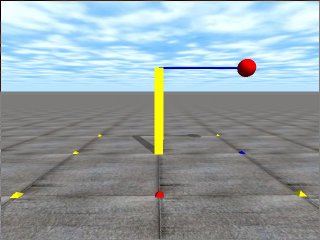
ゲーム開発やロボットの研究者にも使われているオープンソースの物理計算エンジンODE(Open Dynamics Engine、オープン ダイナミクスエンジン)を学ぶODE講座の第12回目です。
Jimmyさんからの御質問にあったように関節にかかるトルクや力を調べるコマンドはわかりづらくなっています.今回は関節にかかるトルクを取得する方法を学びましょう。
ODEでは関節に かかるトルクなどをすぐ取得できません.取得するためにはdJointSetFeedbackで関節を指定してからdJointGetFeedbackで 情報を取得します.これはパフォーマンスを向上させるためです.常に全ての関節にかかる力とトルクが必要なわけではありませんよね.
- void dJointSetFeedback (dJointID, dJointFeedback *);
力とトルクの情報を取得する関節をdJointIDで指定する.dJointFeedback構造体は次のとおりです.typedef struct dJointFeedback {
dVector3 f1; // 関節がボディ1に及ぼしている力
dVector3 t1; // 関節がボディ1に及ぼしているトルク
dVector3 f2; // 関節がボディ2に及ぼしている力
dVector3 t2; // 関節がボディ2に及ぼしているトルク
} dJointFeedback; - dJointFeedback *dJointGetFeedback (dJointID);
dJointIDで指定している関節の力とトルクの情報を取得します.
次 に,このAPIを使ったサンプルプログラムを紹介します.ボックスを固定ジョイント(Fixed Joint)で地面(静的オブジェクト)立て、そこにセンサとなる固定ジョイントで重りのついている棒とボックスを結合します.センサにかかる力を表示するプログラムです.棒の重さが0.0001kgでほぼ無視できます.重りの質量が1kgなのでx軸まわりのトルクは9.8Nmであれば良いわけです.私の環境では理論どおり9.8の値をたたき出していました.ソースファイルはここからダウンロードできます。
[code]
 // torque.cpp  by Kosei Demura  2006-12-05
 #include "ode/ode.h"
 #include "drawstuff/drawstuff.h"


#ifdef dDOUBLE
#define dsDrawCylinder dsDrawCylinderD
#define dsDrawSphere   dsDrawSphereD
#endif

static dWorldID world;
static dSpaceID space;
static dGeomID  ground;
static dJointID sensor,fixed[2];
static dJointGroupID contactgroup;
dJointFeedback *feedback = new dJointFeedback;
dsFunctions fn;

typedef struct {
   dBodyID body;
   dGeomID geom;
   dReal   radius,length,width,height,mass;
 } myLink;
myLink stick, ball, box;

static void nearCallback (void *data, dGeomID o1, dGeomID o2)
 {
 static int MAX_CONTACTS = 10;
 int i;

// exit without doing anything if the two bodies are connected by a joint
 dBodyID b1 = dGeomGetBody(o1);
 dBodyID b2 = dGeomGetBody(o2);
 if (b1 && b2 && dAreConnected(b1,b2)) return;

 dContact contact[MAX_CONTACTS];   // up to MAX_CONTACTS contacts per box-box
 int numc = dCollide(o1,o2,MAX_CONTACTS,&contact[0].geom,
 sizeof(dContact));
 if (numc > 0) {
   for (i=0; i < numc; i++) {
     contact[i].surface.mode  =  dContactSoftCFM | dContactSoftERP;
     contact[i].surface.mu       = dInfinity;
     contact[i].surface.soft_cfm = 1e-8;
     contact[i].surface.soft_erp = 1.0;
     dJointID c = dJointCreateContact(world,contactgroup,&contact[i]);

     dJointAttach (c,dGeomGetBody(contact[i].geom.g1),
     dGeomGetBody(contact[i].geom.g2));
   }
 }
}

static void simLoop (int pause)
{
 static int steps = 0;

 dSpaceCollide(space,0,&nearCallback);
 dWorldStep(world,0.01);
 dJointGroupEmpty(contactgroup);

 feedback = dJointGetFeedback(sensor);
 printf("%5d Torque Tx=%6.2f ",steps++,feedback->t1[0]);
 printf("Ty=%6.2f ",feedback->t1[1]);
 printf("Tz=%6.2f \n",feedback->t1[2]);

// draw a box
 dsSetColor(1.3,1.3,0.0);
 dReal sides1[] = {box.length,box.width,box.height};
 dsDrawBoxD(dBodyGetPosition(box.body),
 dBodyGetRotation(box.body),sides1);

// draw a ball
 dsSetColor(1.3,0.0,0.0);
 dsDrawSphere(dBodyGetPosition(ball.body),
 dBodyGetRotation(ball.body),ball.radius);

// draw a stick
 dsSetColor(0.0,0.0,1.3);
 dsDrawCylinder(dBodyGetPosition(stick.body),
 dBodyGetRotation(stick.body),stick.length, stick.radius);
 }

void start()
 {
 static float xyz[3] = {3.0,0.0,1.0};
 static float hpr[3] = {180.0,0.0,0.0};
 dsSetViewpoint (xyz,hpr);
 dsSetSphereQuality(3);
 }

void  setDrawStuff() {
 fn.version = DS_VERSION;
 fn.start   = &start;
 fn.step    = &simLoop;
 fn.command = NULL;
 fn.stop    = NULL;
 fn.path_to_textures = "../../drawstuff/textures";
 }

int main(int argc, char **argv)
{
 setDrawStuff();

 world = dWorldCreate();
 space = dHashSpaceCreate(0);
 contactgroup = dJointGroupCreate(0);
 dWorldSetGravity(world,0,0,-9.8);
 dWorldSetERP(world,1.0);

// Create a ground
 ground = dCreatePlane(space,0,0,1,0);

 dMass m1;
 dReal x0 = 0.0, y0 = 0.0, z0 = 0.5;
 dReal x1 = 0.0, y1 = 0.5, z1 = 1.0;
 dReal x2 = 0.0, y2 = 1.0, z2 = 1.0;
 dMatrix3 R;

// box
 box.length = 0.1;  box.width  = 0.1;
 box.height = 1.0;  box.mass   = 1.0;
 box.body   = dBodyCreate(world);
 dMassSetZero(&m1);
 dMassSetBoxTotal(&m1,box.mass,box.length,box.width,box.height);
 dBodySetMass(box.body,&m1);
 dBodySetPosition(box.body, x0, y0, z0);
 box.geom = dCreateBox(space,box.length,box.width,box.height);
 dGeomSetBody(box.geom,box.body);

// stick
 stick.length = 1.0;  stick.radius = 0.01;
 stick.mass   = 0.0001;
 stick.body   = dBodyCreate(world);
 dMassSetZero(&m1);
 dMassSetCylinderTotal(&m1,stick.mass,3, stick.radius, stick.length);
 dBodySetMass(stick.body,&m1);
 dBodySetPosition(stick.body, x1, y1, z1);
 dRFromAxisAndAngle(R, 1, 0, 0, M_PI/2);
 dBodySetRotation(stick.body, R);
 stick.geom = dCreateCylinder(space,stick.radius,stick.length);
 dGeomSetBody(stick.geom,stick.body);

// ball
 ball.radius = 0.1;
 ball.mass   = 1.0;
 ball.body   = dBodyCreate(world);
 dMassSetZero(&m1);
 dMassSetSphereTotal(&m1,ball.mass,ball.radius);
 dBodySetMass(ball.body,&m1);
 dBodySetPosition(ball.body, x2, y2, z2);
 ball.geom = dCreateSphere(space,ball.radius);
 dGeomSetBody(ball.geom,ball.body);

// fixed joint
 fixed[0] = dJointCreateFixed(world,0);
 dJointAttach(fixed[0],0, box.body);
 dJointSetFixed(fixed[0]);

 fixed[1] = dJointCreateFixed(world,0);
 dJointAttach(fixed[1],stick.body,ball.body);
 dJointSetFixed(fixed[1]);

 sensor = dJointCreateFixed(world,0);
 dJointAttach(sensor,box.body, stick.body);
 dJointSetFixed(sensor);

// set feed back
 dJointSetFeedback(sensor,feedback);

 dsSimulationLoop(argc,argv,640, 480,&fn);

 dWorldDestroy(world);
 dCloseODE();
 return 0;
}
[/code]

コメント
shinさん,
すみません。恐れ入りますが,何が原因か教えて頂けないでしょうか。
同じような問題で悩まないためにお願いします。
でむ
成功しました。
ありがとうございました。
shinさん,
本文と下にリンクのあるtorque.cppをダウンロード,makeして頂けませんか?同じ開発環境で試したところエラーはでませんでした.
http://demura.net/wordpress/wp-content/uploads/2008/09/torque.cpp
でむ
MinGWです。
shinさん,
度々すみません.
Visual C++ですか? MinGWですか?
でむ
odeのバージョンは0.9
開発環境はWindows XPです。
shinさん,
すみませんが,開発環境とODEのバージョンを教えてください.
でむ
dsDrawBox(dBodyGetPosition(box.body),
dBodyGetRotation(box.body),sides);
の部分で次のようなエラーが出ます。
どうしたらよいのでしょうか?
error: cannot convert `const dReal*’ to `const float*’ for argument `1′ to `void dsDrawBox(const float*, const float*, const float*)’