ROS演習2:はじめてのROSプログラミング
lecture
2016.11.11
この記事は私が担当している講義ロボットプログラミングⅡ用です。ROSでHellow Worldと表示するプログラムを作り、ビルドして実行してみましょう。この記事は以下のROS Wikiの記事を参考にしています。
———————–
1. ワークスペース(作業場所)の作成
これからROSでいろいろなプログラムを作っていきます。まずは、その専用ディレクトリ(フォルダ)を作りましょう。ROSではこれをワークスペースとよびます。catkin_init_workspaceコマンドでワークスペースを作ります。以下のコマンドを実行してください。なお、先頭の$は入力を受け付けるコマンドプロンプトなので打つ必要はありません。
$ source /opt/ros/indigo/setup.bash
$ mkdir -p ~/catkin_ws/src
$ cd ~/catkin_ws/src
$ catkin_init_workspace
2. ビルドの方法
ROSではソースコードをビルドするときにcatkin_makeコマンドを使います。このコマンドを実行するときは~/catkin_wsに移動しなければいけません。重要なので覚えておきましょう。
次のコマンドを実行してください。
$ cd ~/catkin_ws
$ catkin_make
実行後にlsコマンドを実行すると、buildとdevelディレクトリが新たに作成されていることがわかります。
3. 設定
ここで作成したcatkin_wsを有効にするためには以下のコマンドを実行する必要があります。
$ source ~/catkin_ws/devel/setup.bash
毎回、実行するのは面倒なので~/.bashrcの一番最後にテキストエディターgeditで、上のコマンドを付け加え保存しましょう。まず、次のコマンドでgeditを実行します。
$ cd
$ gedit .bashrc
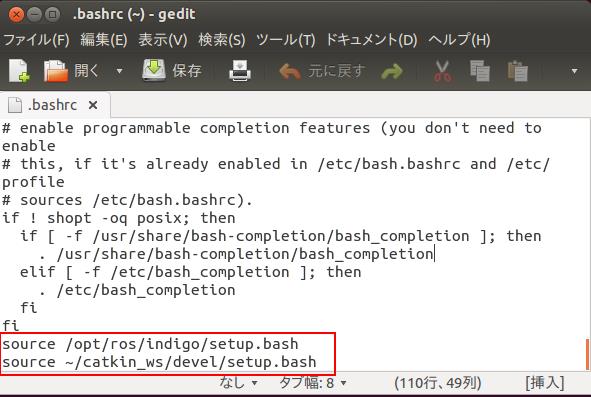
.bashrcの中にsource /opt/ros/indigo/setup.bashがない場合は、下図赤枠のように2行追加してください。保存はgeditの上ツールバーにある「保存」をクリックします。では、うまく設定されたか、次のコマンドで確認しましょう。
$ source .bashrc
$ echo $ROS_PACKAGE_PATH
つぎのように表示されたら成功です。

失敗した場合は、設定をもう一度実行してください。打ち間違えがないか注意しましょう。
4. パッケージの作成
準備ができたので早速、パッケージを作りましょう。パッケージは次のcatkin_create_pkgコマンドで作ります。依存パッケージはそのパッケージを作るために必要なパッケージです。
catkin_create_pkg <パッケージ名> [依存パッケージ1] [依存パッケージ2] [依存パッケージ3]
helloパッケージを作りましょう。ここではC++でコーディングするのでroscppパッケージしか使いません。Pythonを使う場合はrospyになります。
$ cd ~/catkin_ws/src
$ catkin_create_pkg hello roscpp
上手く作成しているか確認します。
$ cd ~/catkin_ws/src/hello
$ ls
CMakeLIsts.txt, include, package.xml, srcができていれば成功です。
package.xmlに作成者(maintainer)の情報などを書きます。ここでは省略します。ROS Wikiのpackage.xmlを参考にしてください。
5. ソースコードの作成とビルド
$ cd ~/catkin_ws/src/hello/src
$ gedit hello_node.cpp
エディタが開くので以下をソースコードを打ち込み保存する。
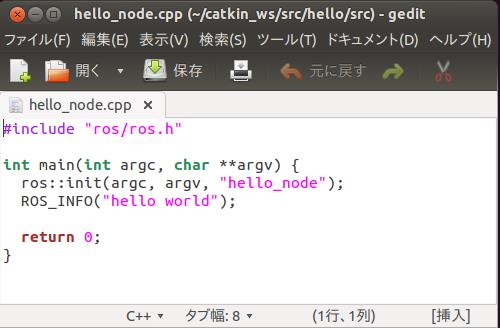
~/catkin_ws/src/hello/CMakeLists.txtの129行目、136~138行目のコメントを次のように外す。
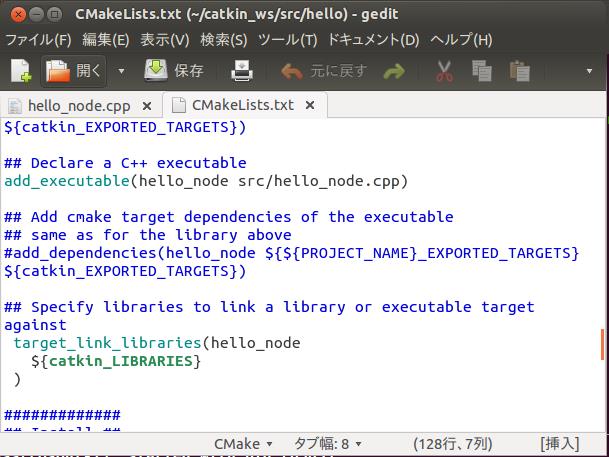
ビルドします。
$ cd ~/catkin_ws
$ catkin_make
6. 実行
以下のroscoreコマンドでMaster(マスター)を実行する。他のノードを実行する前に必要です。
$ roscore
ノードを実行するためにはrosrunコマンドを使います。使い方は次のとおり。
rosrun パッケージ名 実行ファイル名
別の端末を開き、rosrunコマンドでhello_nodeノードを実行する。
なお、hello_nodeは~/catkin_ws/devel/lib/hello/hello_nodeにcatkin_makeコマンドで作られたものです。
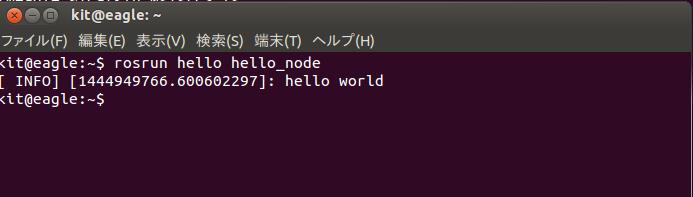
$ rosrun hello hello_node
次のように表示されたら成功。終わり。
4.ホームワーク
").attr(n.scriptAttrs||{}).prop({charset:n.scriptCharset,src:n.url}).on("load error",i=function(e){r.remove(),i=null,e&&t("error"===e.type?404:200,e.type)}),C.head.appendChild(r[0])},abort:function(){i&&i()}}});var Jt,Kt=[],Zt=/(=)\?(?=&|$)|\?\?/;ce.ajaxSetup({jsonp:"callback",jsonpCallback:function(){var e=Kt.pop()||ce.expando+"_"+jt.guid++;return this[e]=!0,e}}),ce.ajaxPrefilter("json jsonp",function(e,t,n){var r,i,o,a=!1!==e.jsonp&&(Zt.test(e.url)?"url":"string"==typeof e.data&&0===(e.contentType||"").indexOf("application/x-www-form-urlencoded")&&Zt.test(e.data)&&"data");if(a||"jsonp"===e.dataTypes[0])return r=e.jsonpCallback=v(e.jsonpCallback)?e.jsonpCallback():e.jsonpCallback,a?e[a]=e[a].replace(Zt,"$1"+r):!1!==e.jsonp&&(e.url+=(At.test(e.url)?"&":"?")+e.jsonp+"="+r),e.converters["script json"]=function(){return o||ce.error(r+" was not called"),o[0]},e.dataTypes[0]="json",i=ie[r],ie[r]=function(){o=arguments},n.always(function(){void 0===i?ce(ie).removeProp(r):ie[r]=i,e[r]&&(e.jsonpCallback=t.jsonpCallback,Kt.push(r)),o&&v(i)&&i(o[0]),o=i=void 0}),"script"}),le.createHTMLDocument=((Jt=C.implementation.createHTMLDocument("").body).innerHTML="
",2===Jt.childNodes.length),ce.parseHTML=function(e,t,n){return"string"!=typeof e?[]:("boolean"==typeof t&&(n=t,t=!1),t||(le.createHTMLDocument?((r=(t=C.implementation.createHTMLDocument("")).createElement("base")).href=C.location.href,t.head.appendChild(r)):t=C),o=!n&&[],(i=w.exec(e))?[t.createElement(i[1])]:(i=Ae([e],t,o),o&&o.length&&ce(o).remove(),ce.merge([],i.childNodes)));var r,i,o},ce.fn.load=function(e,t,n){var r,i,o,a=this,s=e.indexOf(" ");return-1
").append(ce.parseHTML(e)).find(r):e)}).always(n&&function(e,t){a.each(function(){n.apply(this,o||[e.responseText,t,e])})}),this},ce.expr.pseudos.animated=function(t){return ce.grep(ce.timers,function(e){return t===e.elem}).length},ce.offset={setOffset:function(e,t,n){var r,i,o,a,s,u,l=ce.css(e,"position"),c=ce(e),f={};"static"===l&&(e.style.position="relative"),s=c.offset(),o=ce.css(e,"top"),u=ce.css(e,"left"),("absolute"===l||"fixed"===l)&&-1<(o+u).indexOf("auto")?(a=(r=c.position()).top,i=r.left):(a=parseFloat(o)||0,i=parseFloat(u)||0),v(t)&&(t=t.call(e,n,ce.extend({},s))),null!=t.top&&(f.top=t.top-s.top+a),null!=t.left&&(f.left=t.left-s.left+i),"using"in t?t.using.call(e,f):c.css(f)}},ce.fn.extend({offset:function(t){if(arguments.length)return void 0===t?this:this.each(function(e){ce.offset.setOffset(this,t,e)});var e,n,r=this[0];return r?r.getClientRects().length?(e=r.getBoundingClientRect(),n=r.ownerDocument.defaultView,{top:e.top+n.pageYOffset,left:e.left+n.pageXOffset}):{top:0,left:0}:void 0},position:function(){if(this[0]){var e,t,n,r=this[0],i={top:0,left:0};if("fixed"===ce.css(r,"position"))t=r.getBoundingClientRect();else{t=this.offset(),n=r.ownerDocument,e=r.offsetParent||n.documentElement;while(e&&(e===n.body||e===n.documentElement)&&"static"===ce.css(e,"position"))e=e.parentNode;e&&e!==r&&1===e.nodeType&&((i=ce(e).offset()).top+=ce.css(e,"borderTopWidth",!0),i.left+=ce.css(e,"borderLeftWidth",!0))}return{top:t.top-i.top-ce.css(r,"marginTop",!0),left:t.left-i.left-ce.css(r,"marginLeft",!0)}}},offsetParent:function(){return this.map(function(){var e=this.offsetParent;while(e&&"static"===ce.css(e,"position"))e=e.offsetParent;return e||J})}}),ce.each({scrollLeft:"pageXOffset",scrollTop:"pageYOffset"},function(t,i){var o="pageYOffset"===i;ce.fn[t]=function(e){return M(this,function(e,t,n){var r;if(y(e)?r=e:9===e.nodeType&&(r=e.defaultView),void 0===n)return r?r[i]:e[t];r?r.scrollTo(o?r.pageXOffset:n,o?n:r.pageYOffset):e[t]=n},t,e,arguments.length)}}),ce.each(["top","left"],function(e,n){ce.cssHooks[n]=Ye(le.pixelPosition,function(e,t){if(t)return t=Ge(e,n),_e.test(t)?ce(e).position()[n]+"px":t})}),ce.each({Height:"height",Width:"width"},function(a,s){ce.each({padding:"inner"+a,content:s,"":"outer"+a},function(r,o){ce.fn[o]=function(e,t){var n=arguments.length&&(r||"boolean"!=typeof e),i=r||(!0===e||!0===t?"margin":"border");return M(this,function(e,t,n){var r;return y(e)?0===o.indexOf("outer")?e["inner"+a]:e.document.documentElement["client"+a]:9===e.nodeType?(r=e.documentElement,Math.max(e.body["scroll"+a],r["scroll"+a],e.body["offset"+a],r["offset"+a],r["client"+a])):void 0===n?ce.css(e,t,i):ce.style(e,t,n,i)},s,n?e:void 0,n)}})}),ce.each(["ajaxStart","ajaxStop","ajaxComplete","ajaxError","ajaxSuccess","ajaxSend"],function(e,t){ce.fn[t]=function(e){return this.on(t,e)}}),ce.fn.extend({bind:function(e,t,n){return this.on(e,null,t,n)},unbind:function(e,t){return this.off(e,null,t)},delegate:function(e,t,n,r){return this.on(t,e,n,r)},undelegate:function(e,t,n){return 1===arguments.length?this.off(e,"**"):this.off(t,e||"**",n)},hover:function(e,t){return this.on("mouseenter",e).on("mouseleave",t||e)}}),ce.each("blur focus focusin focusout resize scroll click dblclick mousedown mouseup mousemove mouseover mouseout mouseenter mouseleave change select submit keydown keypress keyup contextmenu".split(" "),function(e,n){ce.fn[n]=function(e,t){return 0
タイトルとURLをコピーしました
コメント