This page was mainly translated from http://demura.net/archives/9ode by Babel Fish Translation.
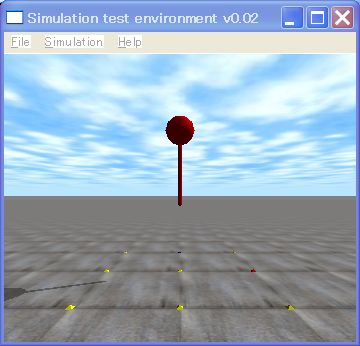
ODE (Open Dynamics Engine) lecture time it is 7th. This time we speak concerning the joint the story whose collision detection is detailed with afterwards. Previous topic coming out, the て it was, but it is possible and increase is high? As for answering, it is in nearCallback function
Contact [ i ] surface.bounce = 0.0; / (0.0 – 1.0) as for coefficient of rebound from 0 up to 1
Being value should have been designated as the 1.0 or less of 0.0 or more, it does. Don’t you think? coefficient of rebound was speed ratio before the colliding and after the collision.
So, it explains concerning the joint. Around us, you fold up the joint and are suitable to the hinge of carrying and the hinge of the door. Small speaking seriously, it meaning that position of two bodies and the restraint which maintains attitude at a certain fixed relationship are with the joint, it does. With ODE the joint and restraint are used in the same sense.
The source code where the object which connects the ball and the cylinder which have shown right away in the upper figure with the hinge joint bounces is shown below. Furthermore, it abbreviates the same function to as the last time and declaration.
[code]
// sample3.cpp by Kosei Demura
#ifdef dDOUBLE
#define dsDrawSphere dsDrawSphereD
#define dsDrawCapsule dsDrawCapsuleD
#endif
typedef struct {
dBodyID body;
dGeomID geom;
dReal radius, length, mass;
} MyLink;
MyLink ball, pole;
static void simLoop (int pause)
{
const dReal *pos1, *R1, *pos2, *R2;
dSpaceCollide (space,0, &nearCallback);
dWorldStep (world,0.01);
dJointGroupEmpty (contactgroup);
dsSetColor (1.0,0.0,0.0);
// Drawing of ball
pos1 = dBodyGetPosition (ball.body);
R1 = dBodyGetRotation (ball.body);
dsDrawSphere (pos1, R1, ball.radius);
// Drawing of cylinder
pos2 = dBodyGetPosition (pole.body);
R2 = dBodyGetRotation (pole.body);
dsDrawCapsule (pos2, R2, pole.length, pole.radius);
}
// Compilation of object
void createBallandPole ()
{
dMass m1;
dReal x0 = 0.0, y0 = 0.0, z0 = 2.5;
// Ball
ball.radius = 0.2; Ball.mass = 1.0;
ball.body = dBodyCreate (world);
dMassSetZero (&m1);
dMassSetSphereTotal (&m1, ball.mass, ball.radius);
dBodySetMass (ball.body, &m1);
dBodySetPosition (ball.body, x0, y0, z0);
ball.geom = dCreateSphere (space, ball.radius);
dGeomSetBody (ball.geom, ball.body);
// Cylinder
pole.radius = 0.025; pole.length = 1.0; pole.mass = 1.0;
pole.body = dBodyCreate (world);
dMassSetZero (&m1);
dMassSetCapsuleTotal (&m1, pole.mass,3, pole.radius, pole.length);
dBodySetMass (pole.body, &m1);
dBodySetPosition (pole.body, x0, y0, z0 – 0.5 * pole.length);
pole.geom = dCreateCapsule (space, pole.radius, pole.length);
dGeomSetBody (pole.geom, pole.body);
// Hinge joint
joint = dJointCreateHinge (world, 0); // Creation of hinge joint
dJointAttach (joint, ball.body, pole.body); // Connecting the body of the ball and the body of the cylinder with the joint
dJointSetHingeAnchor (joint, x0, y0, z0 – ball.radius); // The anchor of the hinge joint (the central point) it sets
dJointSetHingeAxis (joint, 1, 0, 0); // Axis of rotation vector of hinge joint setting (1,0,0)
}
int main (int argc, char **argv)
{
setDrawStuff ();
world = dWorldCreate ();
space = dHashSpaceCreate (0);
contactgroup = dJointGroupCreate (0);
dWorldSetGravity(world,0,0,-9.8); ground=dCreatePlane(space,0,0,1,0);
createBallandPole ();
dsSimulationLoop (argc and argv,352,288, &fn);
dWorldDestroy (world);
return 0;
}
[/code]
With this example the body of the ball and the cylinder is tied with the hinge joint.
Method of using the joint becomes like below.
- Creation of a Joint: dJointCreate***()
- Connection: dJointAttach()
- Set an anchor of a joint:dJointSet***Anchor ()
- Set an axis of a joint: dJointSet***Axis ()
*** denotes a type of joint, i.e., Hinge, Ball, Slider, Universal, and so on.
Let’s read the source code. With createBallandPall function the ball is made first, after that, the cylinder is made, then dJointCreateHinge () with it forms the hinge joint, dJointAttach () with two bodies is connected with the hinge joint. After that dSetHingeAnchor () while turning of the joint position of the heart point is set, dJointSetHingeAxis () with axis of rotation vector is set. With this example as for axis of rotation vector (1,0,0) being to be, it becomes x axial direction. Referring to details the manual.
Formation of the joint is end with this. This time parameter of the joint was not set for simplicity, but also the movable limits and largest torque and setting etc. of maximum angular velocity are possible. Clicking here,downloading the sample program, please play.

コメント