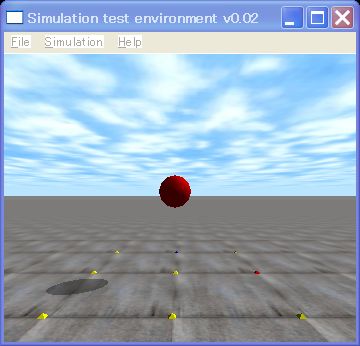
This is the 3rd ODE (Open Dynamics Engine) tutorial.
ODE is simulation using this to the basic flow associated with the API. The sample program as the most simple physical simulation covered by falling objects. Programming is a textbook example is the first Hello World example to show the need. This is the physical simulation version of Hello World.
ODE simulations of a typical flow associated with the API enumeration.
- Simulation flow
- Drawing setting function Drawstuff
- Setup a cameras dsSetViewPoint ()
- Setup a cameras dsSetViewPoint ()
- Initialize ODE dInitODE ()
- Create a world for dynamics dWorldCreate ()
- Set gravity dWorldSetGravity ()
- Create a rigid body
- Set mass dBodySetMass ()
- Set position dBodySetPosition ()
- Set orientation dBodySetRotation ()
- Set mass dBodySetMass ()
- Simulation Loop
- Step a simulation world dWorldStep ()
- Write simulation codes
- Destroy the world dWorldDestroy ()
- Close ODE dCloseODE ()
- Drawing setting function Drawstuff
Then, please read the following source code.
// Sample3 by Kosei Demura
#include "ode/ode.h"
#include "drawstuff/drawstuff.h"
#ifdef  dDOUBLE
#define dsDrawSphere dsDrawSphereD
#endif

static dWorldID world;  // a physics world
dBodyID ball;           // an ball
const dReal radius = 0.2, mass = 1.0; // radius(m)、weight(kg) of an ball

// Simulation loop
static void simLoop (int pause)
{
  const dReal *pos,*R; // position, rotation matrix
  dWorldStep(world,0.05);  // Step a simulation world, time step is 0.05 [s]
 dsSetColor(1.0,0.0,0.0);  // Set color  (red, green, blue) value is from 0 to 1.0
  pos = dBodyGetPosition(ball);  // Get a position
  R = dBodyGetRotation(ball);   // Get a rotation
  dsDrawSphere(pos,R,radius);  // Draw a sphere
}

// Start function void start()
{
  // Set a camera
  static float xyz[3] = {0.0,-3.0,1.0};    // View position (x, y, z [m])
  static float hpr[3] = {90.0,0.0,0.0};   // View direction (head, pitch, roll[°])
  dsSetViewpoint (xyz,hpr);  // Set a view point
}

// main function
int main (int argc, char **argv)
{
  dReal x0 = 0.0, y0 = 0.0, dReal z0 = 1.0; // initial position of an ball[m]
  dMass m1;   // mass parameter

  // for drawstuff
  dsFunctions fn; // drawstuff structure
  fn.version = DS_VERSION;   // the version of the drawstuff
  fn.start = &start;            // start function
  fn.step = &simLoop;          // step function
  fn.command = NULL;       // no command function for keyboard
  fn.stop    = NULL;         // no stop function
  fn.path_to_textures = "../../drawstuff/textures"; // path to the texture

  dInitODE();      // Initialize ODE
  world = dWorldCreate();   // Create a dynamic world
  dWorldSetGravity(world,0,0,-0.001); // Set gravity(x, y, z)

  // Create a ball
  ball = dBodyCreate(world);  //  Crate a rigid body
  dMassSetZero(&m1);     // Initialize mass parameters
  dMassSetSphereTotal(&m1,mass,radius); // Calculate a mass parameter
  dBodySetMass(ball,&m1);  // Set a mass parameter
  dBodySetPosition(ball, x0, y0, z0);  // Set a position(x, y, z)

  // Simulation loop
  // argc, argv are argument of main function. Window size is  352 x 288 [pixel]
  // fn is a structure of drawstuff
  dsSimulationLoop (argc,argv,352,288,&fn);

  dWorldDestroy(world); // Destroy the world
  dCloseODE();                 // Close ODE
  return 0;
}
This is a red ball of a free fall program. The flow of the ODE simulation is as follows, first, dInitODE () initializes ODE. Next, create the dynamic world (World) by calling dWorldCreate () . The gravity is set by dWorldSetGravity(world,0,0,-0.001). In this case, the gravity vector is set to (0, 0, -0.001) that makes objects falling very slowly.
dBodyCreate is called to create a rigid body, then initialize a mass parameter, calculate and set it. Set position of the body by dBodySetPosition().
The simulation is executed by the simLoop function. This function is call in every simulation step.
dWorldStep(world, 0.05) steps is a single step. The second argument is a time step. In this case, 0.05 seconds is stepped. dsDrawSphere() shows a sphere in your computer screen.
At the end of the code, clean up the simulation. dWorldDestroy(world) destroys the world, and dCloseODE () closes ODE.
The function begins with a lowercase ‘d’ is the ODE API (application program interface), and, ‘ds’ is the Drawstuff API. The Drawstuff is the graphics library for demo programs of ODE.
You can download sample1-110105.zip from here, build and run! Visual C 2008 and the Code:: Blocks 8.02 for the project files are included.
This sample program simulates a free fall. A red ball falls and disappears because of lacking the collision detection function.
Next time, we learn how to use the Drawstuff which is a simple 3 D graphics library based on OpenGL.
API
- dBodyID dBodyCreate (dWorldID world)
Create a rigid body and return the ID number of it. - const dReal * dBodyGetPosition (dBodyID body)
Get the center of gravity of the body, and return the pointer of it. - const dReal * dBodyGetRotation (dBodyID body)
Get the rotation matrix and return its pointer. - void dBodySetMass (dBodyID body, const dMass * mass)
Set the mass parameter to the body. - void dBodySetPosition (dBodyID body, dReal x, dReal y, dReal z)
Set the position (x, y, z), the absolute coordinate system, to the body. - void dBodySetRotation (dBodyID body, const dMatrix3 R)
Set the rotation matrix R to the body. - dGeomID dCreateBox (dSpaceID space, dReal lx, dReal ly, dReal lz)
Create a box with the size of (lx, ly, lz) according each x, y, z axis, and return its ID number. - dGeomID dCreateCylinder (dSpaceID space, dReal r, dReal l)
Create a cylinder with, a radius: r, length:l and return its ID number - dGeomID dCreatePlane (dSpaceID space, dReal a, dReal b, dReal c, dReal d)
Create a plane which is described by ax+ by+ cz = d, and return its ID. - void dGeomSetBody (dGeomID geom, dBodyID body)
Two attributes of the object are a geometry and a body. This API associates both. - dSpaceID dHashSpaceCreate (0)
Create a hash space for collision dectection and return its ID. - void dJointGroupEmpty (dJointGroupID)
Contact points are stored in the joint group. This API empties the joint group. - void dJointAttach (dJointID joint, dBodyID body1, dBodyID dBody2)
Attach the joint to body1 and body2. - dJointGroupID dJointGroupCreate (0)
Create the joint group and return its ID. - void dMassSetBoxTotal (dMass * mass, dReal m, dReal lx, dReal ly, dReal lz)
Calculate the mass related parameter, i.e. the moment of inertia, of the box with the size of (lx, ly, lz). - void dMassSetCylinderTotal (dMass * mass, dReal m, int dir, dReal r, dReal l)
Calculate the mass of the cylinder with the Direction dir: (1 = x, 2 = y, 3 = z), radius: r, the length: l, and mass:m total mass of the cylinder - void dMassSetZero (dMass * mass)
Initalize an argument mass - void dRFromAxisAndAngle (dMatrix3 R, dReal ax, dReal ay, dReal az, dReal angle)
Get the rotation matrix from the axial vector(ax, ay, az) and rotation angle [rad] - void dSpaceCollide (dSpaceID space, void * data, dNearCallback * callback)
Call the callback function, callback, which is used for the collision detection. - dWorldID dWorldCreate ()
Create the dynamics world and return its ID. - void dWorldDestroy (dWorldID world)
Destroy the world. - void dWorldSetGravity (dWorldID world, dReal x, dReal y, dReal z)
Set the acceleration of gravity (x, y, z) [m/s^2] to the world. - void dWorldStep (dWorldID world, dReal step_size)
Step a single simulation. The second argument step_size[s] is integral step time. - void dsDrawBoxD (const double pos [3], const double R [12], const double sides [3])
Draw the box with the position pos, the rotation matrix R and the size of sides. - void dsSetViewPoint (float xyz [3], float hpr [3])
Set the view-point of the camera. xyz[3] are xyz positions[m] and hpr are heading, pitch, roll [°]. - void dsSimulationLoop (int argc, char ** argv, int w, int h, dsfunction * fn)
Call the simulation loop. the first and the second argument are arguments from the main function, the third and fourth argument is the size of the window (width: w, height:h), fifth argument is the pointer of the drawing function.