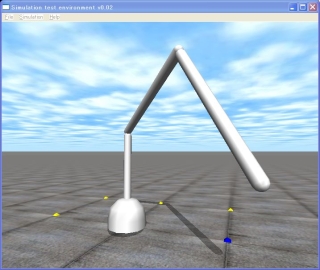
A robot arm simulator
This is the 13th ODE (Open Dynamics Engine) tutorial.
This time, let’s make a simple 3-articulated (DOF: Degree of Freedom) robot arm gathering knowledge so far. Using the ODE, you can make such a simulator only about 100 lines. Collision detentions are omitted to simplify the sample program. The robot can be operated by a keyboard. The first joint can be moved by the ‘ j’ (increase) or ‘f’ (decrease) key, ‘d’ and ‘k’ keys move the second joint, and ‘l’ and ‘s’ keys moves the third joints.
To move the joints, using a simple control, the P control, which controls the joint proportional to the difference between the current value of the angular velocity and the target velocity. The current value of joint angle values and the target are far apart, if you have a large angular velocity and angular velocity if the goal is the same as the value 0 to stop the next joint. Also, as the target for the current best value, you will be a negative sign for a reversal of rotation, and the current value is close to the target value.
The control function realizes that. dParamVel is the target angular velocity, and dParamFMax is the maximum torque to realize the angular velocity. If dParamFMax is set to 0, you cannot control the joint, because the torque is not provided to the joint.
The source code, sample13-110105.zip, can be download from here.
//  sample13.cpp  3 DOF manipulator by   Kosei Demura  2006-2009
#include "ode/ode.h"   // ODE
#include "drawstuff/drawsutt.h"
#define NUM 4         // Number of links

dWorldID    world;       // A dynamic world
dBodyID     link[NUM];    // Links link[0] is a base
dJointID    joint[NUM];  // Joints    joint[0] is a fixed joint between a base and a ground
static double THETA[NUM] = { 0.0, 0.0, 0.0, 0.0};  // Target joint angels[rad]
static double l[NUM]  = { 0.10, 0.90, 1.00, 1.00};  // Length of links[m]
static double r[NUM]  = { 0.20, 0.04, 0.04, 0.04};  // Radius of links[m]

void control() {  /***  P control  ****/
  static int step = 0;     // Steps of simulation
  double k1 =  10.0,  fMax  = 100.0; // k1: proportional gain,  fMax:Max torque[Nm]

  printf("\r%6d:",step++);
  for (int j = 1; j < NUM; j++) {
    double tmpAngle = dJointGetHingeAngle(joint[j]);  // Present angle[rad]
    double z = THETA[j] - tmpAngle;  // z: residual=target angle - present angle
    dJointSetHingeParam(joint[j], dParamVel, k1*z); // Set angular velocity[m/s]
    dJointSetHingeParam(joint[j], dParamFMax, fMax); // Set max torque[N/m]
  }
}

void start() { /*** Initialize drawing API ***/
  float xyz[3] = {  3.04, 1.28, 0.76};   // View point x, y, z [m]
  float hpr[3] = { -160.0, 4.50, 0.00};  // View direction(heading, pitch, roll) [°]
  dsSetViewpoint(xyz,hpr);   // Set view-point and gaze direction
}

void command(int cmd) { /*** Keyboard function ***/
  switch (cmd) {
    case ‘j'’:  THETA[1] += 0.05; break;  // When j key is pressed, THETA[1] is increases at 0.05[rad]
    case 'f':  THETA[1] -= 0.05; break;
    case 'j':  THETA[2] += 0.05; break;
    case 'd':  THETA[2] -= 0.05; break;
    case 'l':  THETA[3] += 0.05; break;
    case 's':  THETA[3] -= 0.05; break;
    }
    if (THETA[1] <   - M_PI)    THETA[1] =  - M_PI;
    if (THETA[1] >     M_PI)    THETA[1] =    M_PI;
    if (THETA[2] <  -2*M_PI/3)  THETA[2] =  - 2*M_PI/3;
    if (THETA[2] >   2*M_PI/3)  THETA[2] =    2*M_PI/3;
    if (THETA[3] <  -2*M_PI/3)  THETA[3] =  - 2*M_PI/3;
    if (THETA[3] >   2*M_PI/3)  THETA[3] =    2*M_PI/3;
}

// Simulation loop
void simLoop(int pause) {
  control();
  dWorldStep(world, 0.02);

  // Draw a robot
  dsSetColor(1.0,1.0,1.0); // Set color (r, g, b), In this case white is set
  for (int i = 0; i < NUM; i++ ) // Draw capsules for links
    dsDrawCapsuleD(dBodyGetPosition(link[i]), dBodyGetRotation(link[i]), l[i], r[i]);
}

int main(int argc, char *argv[]) {
  dsFunctions fn;
  double x[NUM] = {0.00}, y[NUM] = {0.00};  // Center of gravity
  double z[NUM]         = { 0.05, 0.50, 1.50, 2.55};
  double m[NUM] = {10.00, 2.00, 2.00, 2.00};       // mass
  double anchor_x[NUM]  = {0.00}, anchor_y[NUM] = {0.00};// anchors of joints
  double anchor_z[NUM] = { 0.00, 0.10, 1.00, 2.00};
  double axis_x[NUM]  = { 0.00, 0.00, 0.00, 0.00};  // axises of joints
  double axis_y[NUM]  = { 0.00, 0.00, 1.00, 1.00};
  double axis_z[NUM]  = { 1.00, 1.00, 0.00, 0.00};
  fn.version = DS_VERSION;  fn.start   = &start;   fn.step   = &simLoop;
  fn.command = &command;
  fn.path_to_textures = "../../drawstuff/textures";

  dInitODE();  // Initialize ODE
  world = dWorldCreate();  // Create a world
  dWorldSetGravity(world, 0, 0, -9.8);

  for (int i = 0; i < NUM; i++) {
    dMass mass;
    link[i] = dBodyCreate(world);
    dBodySetPosition(link[i], x[i], y[i], z[i]); // Set a position
    dMassSetZero(&mass);      // Set mass parameter to zero
    dMassSetCapsuleTotal(&mass,m[i],3,r[i],l[i]);  // Calculate mass parameter
    dBodySetMass(link[i], &mass);  // Set mass
  }

  joint[0] = dJointCreateFixed(world, 0); // A fixed joint
  dJointAttach(joint[0], link[0], 0);     // Attach the joint between the ground and the base
  dJointSetFixed(joint[0]);               // Set the fixed joint

  for (int j = 1; j < NUM; j++) {
    joint[j] = dJointCreateHinge(world, 0); // Create a hinge joint
    dJointAttach(joint[j], link[j-1], link[j]); // Attach the joint
    dJointSetHingeAnchor(joint[j], anchor_x[j], anchor_y[j],anchor_z[j]);
    dJointSetHingeAxis(joint[j], axis_x[j], axis_y[j], axis_z[j]);
  }
  dsSimulationLoop(argc, argv, 640, 570, &fn); // Simulation loop
  dCloseODE();
  return 0;
}
That’s all. See you !
demu